


 收藏人数:
收藏人数:
 购买源码授权版(
 试用
试用
 赞赏(0)
赞赏(0)
更新记录
1.0.1(2025-11-05)
1.0.0(2025-10-29)
初始化插件
平台兼容性
uni-app
| Vue2 | Vue3 | Chrome | Safari | app-vue | app-nvue | Android | iOS | 鸿蒙 |
|---|---|---|---|---|---|---|---|---|
| √ | √ | √ | √ | √ | √ | 5.0 | 12 | √ |
| 微信小程序 | 支付宝小程序 | 抖音小程序 | 百度小程序 | 快手小程序 | 京东小程序 | 鸿蒙元服务 | QQ小程序 | 飞书小程序 | 小红书小程序 | 快应用-华为 | 快应用-联盟 |
|---|---|---|---|---|---|---|---|---|---|---|---|
| √ | √ | √ | √ | √ | √ | √ | √ | √ | - | √ | √ |
uni-app x(3.6.12)
| Chrome | Safari | Android | iOS | 鸿蒙 | 微信小程序 |
|---|---|---|---|---|---|
| √ | √ | 5.0 | 12 | √ | √ |
其他
| 多语言 | 暗黑模式 | 宽屏模式 |
|---|---|---|
| √ | √ | √ |
hy-drag-sort-plus
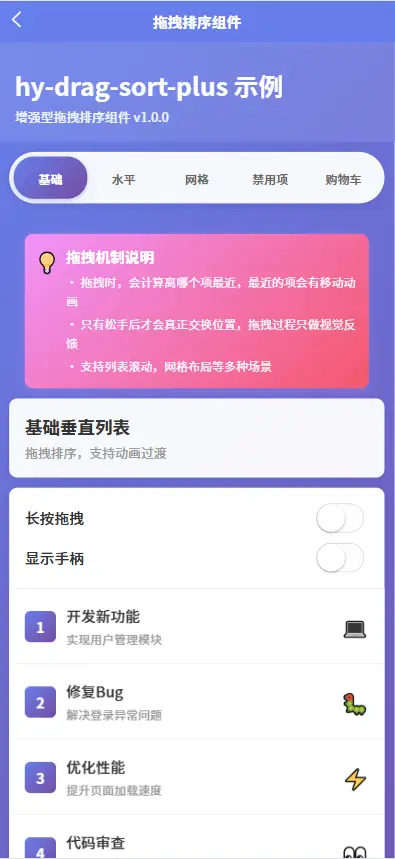
增强型拖拽排序组件,支持列表、网格、水平滚动等多种布局,提供流畅的拖拽体验
✨ 特性
- 🎯 多种布局 - 支持垂直列表、水平滚动、网格布局
- 🎨 高度可定制 - 支持自定义样式、动画时长、拖拽手柄
- 📱 触摸友好 - 优化移动端触摸体验,支持长按拖拽
- 🎭 动画流畅 - 平滑的过渡动画,提升用户体验
- 🔒 禁用控制 - 支持禁用整个组件或单个项目
- 🎪 克隆模式 - 支持占位符和克隆两种拖拽模式
- 🚀 性能优化 - 使用 CSS transform 优化动画性能
- 📦 零依赖 - 无需额外安装依赖包
- 💪 TypeScript - 提供完整的类型定义
- ⚡ uni-app x - 完全兼容 uni-app x,支持 .uvue 语法
🎬 快速开始
导入组件
// Vue2/Vue3 项目
import HyDragSortPlus from '@/uni_modules/hy-drag-sort-plus/components/hy-drag-sort-plus/hy-drag-sort-plus.vue';

// uni-app x 项目 ⭐
import HyDragSortPlus from '@/uni_modules/hy-drag-sort-plus/components/hy-drag-sort-plus/hy-drag-sort-plus.uvue';

export default {
  components: {
    HyDragSortPlus
  }
}
基础用法
<template>
  <hy-drag-sort-plus v-model="list" @change="onChange">
    <template #default="{ item, index }">
      <view class="item">
        <text>{{ item.name }}</text>
      </view>
    </template>
  </hy-drag-sort-plus>
</template>

<script>
export default {
  data() {
    return {
      list: [
        { id: 1, name: '项目 1' },
        { id: 2, name: '项目 2' },
        { id: 3, name: '项目 3' }
      ]
    }
  },
  methods: {
    onChange(event) {
      console.log('顺序变化:', event);
    }
  }
}
</script>
📚 API 文档
Props 属性
| 属性名 | 类型 | 默认值 | 说明 |
|---|---|---|---|
| list | Array | [] | 列表数据(支持 v-model) |
| modelValue | Array | [] | v-model 绑定值 |
| direction | String | 'vertical' | 排列方向:'vertical' | 'horizontal' | 'grid' |
| dragClass | String | '' | 拖拽时添加的类名 |
| ghostClass | String | '' | 拖拽占位符的类名 |
| chosenClass | String | '' | 选中时添加的类名 |
| handle | Boolean | false | 是否显示拖拽手柄 |
| disabled | Boolean | false | 是否禁用拖拽 |
| animation | Number | 150 | 动画时长(ms) |
| longPress | Boolean | false | 是否需要长按才能拖拽 |
| longPressDelay | Number | 350 | 长按延迟时间(ms) |
| group | String | '' | 拖拽组,同组可跨容器拖拽 |
| itemKey | String | 'id' | 项的唯一标识字段 |
| disabledKey | String | Function | 'disabled' | 禁用项的字段或判断函数 |
| ghostMode | String | 'clone' | 占位符模式:'placeholder' | 'clone' |
| gridColumns | Number | 3 | 网格列数(direction 为 grid 时生效) |
| gridGap | String | '10rpx' | 网格间距 |
Events 事件
| 事件名 | 参数 | 说明 |
|---|---|---|
| update:list | (list: Array) | 列表数据更新 |
| update:modelValue | (list: Array) | v-model 值更新 |
| change | (event: DragChangeEvent) | 顺序变化时触发 |
| drag-start | (event: DragEvent) | 开始拖拽时触发 |
| drag-end | (event: DragEvent) | 结束拖拽时触发 |
| drag-move | (event: DragMoveEvent) | 拖拽移动时触发 |
Slots 插槽
| 插槽名 | 参数 | 说明 |
|---|---|---|
| default | { item, index } | 默认插槽,用于自定义项内容 |
| ghost | { item, index } | 拖拽占位符插槽(ghostMode 为 'clone' 时) |
| handle | - | 拖拽手柄插槽 |
事件对象类型
// 拖拽事件
interface DragEvent {
  index: number;        // 项索引
  item: any;           // 项数据
  event: TouchEvent;   // 原始触摸事件
}

// 变化事件
interface DragChangeEvent {
  from: number;        // 原始索引
  to: number;          // 目标索引
  item: any;          // 项数据
  list: Array;        // 更新后的列表
  event: TouchEvent;  // 原始触摸事件
}

// 移动事件
interface DragMoveEvent {
  from: number;       // 原始索引
  to: number;         // 当前目标索引
  item: any;         // 项数据
  event: TouchEvent; // 原始触摸事件
}
🎯 使用示例
示例1:基础垂直列表
<template>
  <hy-drag-sort-plus
    v-model="list"
    :animation="200"
    @change="onListChange"
  >
    <template #default="{ item, index }">
      <view class="list-item">
        <text class="item-index">{{ index + 1 }}</text>
        <text class="item-title">{{ item.title }}</text>
      </view>
    </template>
  </hy-drag-sort-plus>
</template>

<script>
export default {
  data() {
    return {
      list: [
        { id: 1, title: '开发新功能' },
        { id: 2, title: '修复Bug' },
        { id: 3, title: '优化性能' }
      ]
    }
  },
  methods: {
    onListChange(event) {
      console.log(`从位置 ${event.from} 移到 ${event.to}`);
    }
  }
}
</script>

<style scoped>
.list-item {
  padding: 30rpx;
  background: #fff;
  border-bottom: 1rpx solid #eee;
  display: flex;
  align-items: center;
}

.item-index {
  width: 60rpx;
  height: 60rpx;
  background: #667eea;
  color: #fff;
  border-radius: 12rpx;
  display: flex;
  align-items: center;
  justify-content: center;
  margin-right: 20rpx;
}
</style>
示例2:水平滚动列表
<template>
  <hy-drag-sort-plus
    v-model="cards"
    direction="horizontal"
    :animation="300"
  >
    <template #default="{ item }">
      <view class="card" :style="{ background: item.color }">
        <text class="card-emoji">{{ item.emoji }}</text>
        <text class="card-title">{{ item.title }}</text>
      </view>
    </template>
  </hy-drag-sort-plus>
</template>

<script>
export default {
  data() {
    return {
      cards: [
        { id: 1, title: '待办', emoji: '📝', color: '#667eea' },
        { id: 2, title: '进行中', emoji: '⏳', color: '#f093fb' },
        { id: 3, title: '已完成', emoji: '✅', color: '#43e97b' }
      ]
    }
  }
}
</script>

<style scoped>
.card {
  width: 280rpx;
  height: 320rpx;
  border-radius: 16rpx;
  padding: 40rpx;
  margin: 30rpx 20rpx;
  display: flex;
  flex-direction: column;
  align-items: center;
  justify-content: center;
}

.card-emoji {
  font-size: 80rpx;
  margin-bottom: 20rpx;
}

.card-title {
  font-size: 32rpx;
  color: #fff;
  font-weight: bold;
}
</style>
示例3:网格布局
<template>
  <hy-drag-sort-plus
    v-model="gridItems"
    direction="grid"
    :grid-columns="3"
    grid-gap="20rpx"
    ghost-mode="clone"
  >
    <template #default="{ item }">
      <view class="grid-item">
        <view class="item-icon" :style="{ background: item.gradient }">
          <text class="icon-emoji">{{ item.emoji }}</text>
        </view>
        <text class="item-label">{{ item.label }}</text>
      </view>
    </template>

    <template #ghost="{ item }">
      <view class="ghost-item">
        <text>{{ item.emoji }}</text>
      </view>
    </template>
  </hy-drag-sort-plus>
</template>

<script>
export default {
  data() {
    return {
      gridItems: [
        { id: 1, emoji: '🎨', label: '设计', gradient: 'linear-gradient(135deg, #667eea 0%, #764ba2 100%)' },
        { id: 2, emoji: '💻', label: '开发', gradient: 'linear-gradient(135deg, #f093fb 0%, #f5576c 100%)' },
        { id: 3, emoji: '📱', label: '移动端', gradient: 'linear-gradient(135deg, #4facfe 0%, #00f2fe 100%)' },
        // ... 更多项
      ]
    }
  }
}
</script>
示例4:带手柄的拖拽
<template>
  <hy-drag-sort-plus
    v-model="taskList"
    :handle="true"
  >
    <template #default="{ item }">
      <view class="task-item">
        <text class="task-title">{{ item.title }}</text>
        <text class="task-time">{{ item.time }}</text>
      </view>
    </template>
  </hy-drag-sort-plus>
</template>
示例5:长按拖拽
<template>
  <hy-drag-sort-plus
    v-model="list"
    :long-press="true"
    :long-press-delay="500"
  >
    <template #default="{ item }">
      <view class="item">{{ item.name }}</view>
    </template>
  </hy-drag-sort-plus>
</template>
示例6:禁用某些项
<template>
  <hy-drag-sort-plus
    v-model="list"
    disabled-key="locked"
  >
    <template #default="{ item }">
      <view class="item" :class="{ locked: item.locked }">
        <text>{{ item.name }}</text>
        <text v-if="item.locked">🔒</text>
      </view>
    </template>
  </hy-drag-sort-plus>
</template>

<script>
export default {
  data() {
    return {
      list: [
        { id: 1, name: '可拖拽项', locked: false },
        { id: 2, name: '锁定项', locked: true },
        { id: 3, name: '可拖拽项', locked: false }
      ]
    }
  }
}
</script>
示例7:自定义拖拽判断
<template>
  <hy-drag-sort-plus
    v-model="list"
    :disabled-key="isItemDisabled"
  >
    <template #default="{ item }">
      <view class="item">{{ item.name }}</view>
    </template>
  </hy-drag-sort-plus>
</template>

<script>
export default {
  methods: {
    isItemDisabled(item) {
      // 自定义禁用逻辑
      return item.status === 'completed' || item.priority === 'urgent';
    }
  }
}
</script>
示例8:购物车场景
<template>
  <view class="cart">
    <hy-drag-sort-plus
      v-model="cartItems"
      :handle="true"
      @change="onCartChange"
    >
      <template #default="{ item, index }">
        <view class="cart-item">
          <image class="item-image" :src="item.image" />
          <view class="item-info">
            <text class="item-name">{{ item.name }}</text>
            <text class="item-price">¥{{ item.price }}</text>
          </view>
          <view class="item-actions">
            <text @click="removeItem(index)">删除</text>
          </view>
        </view>
      </template>
    </hy-drag-sort-plus>
  </view>
</template>
🎨 自定义样式
拖拽状态样式
<template>
  <hy-drag-sort-plus
    v-model="list"
    drag-class="dragging"
    chosen-class="chosen"
    ghost-class="ghost"
  >
    <template #default="{ item }">
      <view class="item">{{ item.name }}</view>
    </template>
  </hy-drag-sort-plus>
</template>

<style>
/* 拖拽中的样式 */
.item.dragging {
  opacity: 0.5;
  transform: scale(0.95);
}

/* 选中时的样式 */
.item.chosen {
  background: #f0f0f0;
  box-shadow: 0 4rpx 12rpx rgba(0, 0, 0, 0.15);
}

/* 占位符样式 */
.ghost {
  background: rgba(102, 126, 234, 0.1);
  border: 2rpx dashed #667eea;
}
</style>
💡 最佳实践
1. 性能优化
- 对于大量数据,建议配合虚拟滚动使用
- 避免在拖拽过程中进行复杂计算
- 使用
itemKey指定唯一标识,提升渲染性能
2. 用户体验
- 移动端建议启用长按拖拽(
long-press) - 复杂操作场景建议使用拖拽手柄(
handle) - 设置合适的动画时长(推荐 150-300ms)
3. 数据同步
// ✅ 推荐:使用 v-model
<hy-drag-sort-plus v-model="list" />

// ✅ 推荐:监听 change 事件
<hy-drag-sort-plus :list="list" @change="handleChange" />

// ❌ 不推荐:直接修改 list
// 组件内部使用的是 list 的副本,直接修改不会触发更新
4. 禁用项处理
// 使用字段判断
disabled-key="disabled"

// 使用函数判断(更灵活)
:disabled-key="item => item.status === 'locked'"
⚠️ 注意事项
- 唯一标识:确保列表项有唯一的
id或通过itemKey指定其他唯一字段 - 数组响应式:使用
v-model或正确处理数组更新以保持响应式 - 样式权重:自定义样式可能需要使用
!important覆盖默认样式 - 触摸事件:避免在拖拽项内使用其他触摸事件,可能会产生冲突
- 网格布局:使用网格布局时,确保容器宽度固定或可计算
🔧 常见问题
Q: 拖拽不生效?
A: 检查以下几点:
- 是否设置了
disabled为true - 是否启用了
handle但没有从正确位置开始拖拽 - 是否启用了
longPress但没有长按
Q: 列表更新不及时?
A: 使用 v-model 绑定或正确监听 change 事件更新数据。
Q: 如何实现跨容器拖拽?
A: 设置相同的 group 属性(此功能规划中)。
Q: 网格布局拖拽不准确?
A: 确保 gridColumns 设置正确,容器宽度固定。
📱 平台支持
| 平台 | 支持状态 | 说明 |
|---|---|---|
| uni-app x (Android) | ✅ | 完全支持,使用 .uvue 文件 |
| uni-app x (iOS) | ✅ | 完全支持,使用 .uvue 文件 |
| uni-app x (Web) | ✅ | 完全支持,使用 .uvue 文件 |
| Vue2 | ✅ | 使用 .vue 文件 |
| Vue3 | ✅ | 使用 .vue 文件 |
| H5 | ✅ | 使用 .vue 文件 |
| 微信小程序 | ✅ | 使用 .vue 文件 |
| 支付宝小程序 | ✅ | 使用 .vue 文件 |
| 百度小程序 | ✅ | 使用 .vue 文件 |
| 字节小程序 | ✅ | 使用 .vue 文件 |
| QQ小程序 | ✅ | 使用 .vue 文件 |
| App (nvue) | ✅ | 使用 .nvue 文件 |
| App (vue) | ✅ | 使用 .vue 文件 |
uni-app x 使用说明
在 uni-app x 项目中,请使用 .uvue 文件:
// ✅ 正确
import HyDragSortPlus from '@/uni_modules/hy-drag-sort-plus/components/hy-drag-sort-plus/hy-drag-sort-plus.uvue';

// ❌ 错误(会报错)
import HyDragSortPlus from '@/uni_modules/hy-drag-sort-plus/components/hy-drag-sort-plus/hy-drag-sort-plus.vue';
💖 支持
如果这个组件对你有帮助,请给一个 ⭐️ Star 支持一下!
 下载 302
 赞赏 2
赞赏 2


 下载 12597607
 赞赏 1949





























 赞赏
赞赏

 京公网安备:11010802035340号