


 收藏人数:
收藏人数:
 下载插件并导入HBuilder
 下载示例项目ZIP
 赞赏(0)
赞赏(0)
更新记录
1.0.0(2025-12-08) 下载此版本
- 初版
平台兼容性
uni-app(4.75)
| Vue2 | Vue3 | Chrome | Safari | app-vue | app-nvue | Android | iOS | 鸿蒙 |
|---|---|---|---|---|---|---|---|---|
| × | - | × | × | × | × | × | × | √ |
| 微信小程序 | 支付宝小程序 | 抖音小程序 | 百度小程序 | 快手小程序 | 京东小程序 | 鸿蒙元服务 | QQ小程序 | 飞书小程序 | 小红书小程序 | 快应用-华为 | 快应用-联盟 |
|---|---|---|---|---|---|---|---|---|---|---|---|
| × | × | × | × | × | × | × | × | × | - | × | × |
其他
| 多语言 | 暗黑模式 | 宽屏模式 | 蒸汽模式 |
|---|---|---|---|
| × | × | √ | √ |
vk-get-phone-number
简介
鸿蒙应用授权手机号登录插件,支持华为账号一键登录、获取匿名手机号、获取用户信息(昵称、头像)。
支持平台: 仅支持鸿蒙App (uni-app)
效果图:
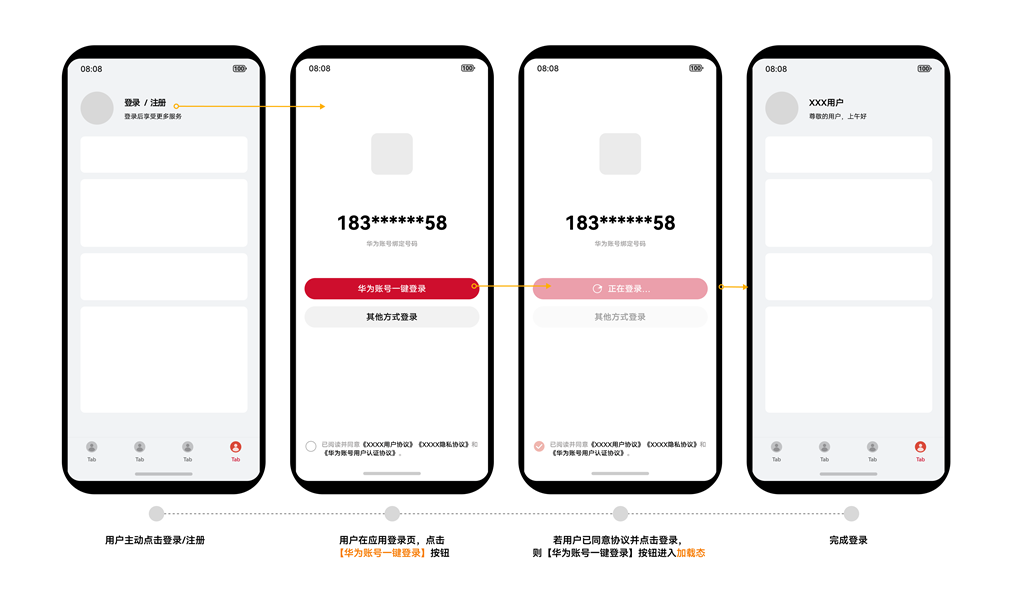
注意:上图来自鸿蒙官方文档,使用本插件即可实现与上图一致的功能体验。
快速开始
1. 安装插件
在 HBuilderX 中导入本插件到项目的 uni_modules 目录。
2. 使用方法
使用 <vk-get-phone-number> 组件实现一键登录:
提示:此组件会按需动态引入,无需手动引入组件
<template>
  <view>
    <!-- 一键登录按钮 -->
    <vk-get-phone-number :need-user-info="true" @getphonenumber="handleLogin" @error="handleError"/>
  </view>
</template>

<script setup>
const handleLogin = (e) => {
  console.log('登录成功', e.detail);
  // e.detail 包含: code, nickname, avatar
}

const handleError = (err) => {
  console.error('登录失败', err);
}
</script>
3. 获取匿名手机号
页面加载时可获取匿名手机号用于展示(如 138****5678):
import { getAnonymousPhoneNumber } from '@/uni_modules/vk-get-phone-number'

getAnonymousPhoneNumber({
  success: (res) => {
    console.log('匿名手机号:', res.quickLoginAnonymousPhone); // 138****5678
  },
  fail: (err) => {
    console.error('获取失败:', err);
  }
})
API 说明
组件 Props
| 参数 | 类型 | 默认值 | 说明 |
|---|---|---|---|
| need-user-info | Boolean | false | 是否获取用户信息(昵称、头像) |
组件 Events
| 事件名 | 说明 | 回调参数 |
|---|---|---|
| getphonenumber | 授权成功 | e.detail: { code, openid, unionid, nickname?, avatar? } |
| error | 授权失败 | err: { errCode, errMsg } |
API 方法
getAnonymousPhoneNumber(options)
获取匿名手机号(用于页面展示,如 138****5678)
参数:
{
  success: (res) => void,  // res: { code, quickLoginAnonymousPhone, openid, unionid }
  fail: (err) => void      // err: 错误信息
}
完整示例
<template>
    <view class="app">
        <view class="logo-wrapper">
            <view class="logo-bg">
                <image class="logo-image" src="/static/logo.png" mode="aspectFill"></image>
            </view>
        </view>
        <view class="phone-text">{{ phone || '***********' }}</view>
        <view class="desc-text">华为账号绑定号码</view>
        <vk-get-phone-number class="login-button" :need-user-info="true" @getphonenumber="loginByHuaweiPhoneNumber" @error="loginByHuaweiPhoneNumberError" />
        <view class="other-login-button" @click="otherLogin"> 其他方式登录 </view>
        <view class="agreement-wrapper">
            <view class="checkbox-wrapper" @click="toggleAgreement">
                <view class="checkbox" :class="{ checked: isAgreed }">
                    <text v-if="isAgreed" class="checkbox-icon">✓</text>
                </view>
            </view>
            <view class="agreement-content">
                <text class="agreement-text" @click="toggleAgreement">已阅读并同意</text>
                <text class="agreement-link" @click.stop="onUserAgreementClick">《xxx用户协议》</text>
                <text class="agreement-link" @click.stop="onPrivacyAgreementClick">《xxx隐私协议》</text>
                <text class="agreement-text">和</text>
                <text class="agreement-link" @click.stop="onHuaweiAgreementClick">《华为账号用户认证协议》</text>
            </view>
        </view>
    </view>
</template>

<script setup>
    import { ref } from 'vue'
    import { onLoad } from '@dcloudio/uni-app'
    import { getAnonymousPhoneNumber } from '@/uni_modules/vk-get-phone-number'

    const phone = ref("")
    const options = ref({})
    const isAgreed = ref(false)

    onLoad(() => {
        getAnonymousPhoneNumber({
            success: (res) => {
                phone.value = res.quickLoginAnonymousPhone
            },
            fail: (err) => {
                console.error('err: ', err);
            }
        })
    })

    const loginByHuaweiPhoneNumber = (e) => {
        // console.log('detail: ', e.detail);
        let { code, nickname, avatar } = e.detail;
        if (!code) {
            return false;
        }
        if (!isAgreed.value) {
            uni.showToast({
                title: '请先阅读并同意相关协议',
                icon: 'none',
                duration: 1000
            });
            return false;
        }
        console.log("data", {
            code,
            nickname,
            avatar
        });
        if (typeof vk === "object") {
            vk.userCenter.loginByHuaweiPhoneNumber({
                data: {
                    code,
                    nickname,
                    avatar
                },
                success(data) {
                    vk.alert(data.msg);
                }
            });
        }
    }

    const loginByHuaweiPhoneNumberError = (err) => {
        console.error('getPhoneNumberError: ', err);
    }

    const otherLogin = () => {
        console.log('其他方式登录')
    }

    const toggleAgreement = () => {
        isAgreed.value = !isAgreed.value
        console.log('协议勾选状态:', isAgreed.value)
    }

    const onUserAgreementClick = () => {
        console.log('点击了《xxx用户协议》')
    }

    const onPrivacyAgreementClick = () => {
        console.log('点击了《xxx隐私协议》')
    }

    const onHuaweiAgreementClick = () => {
        console.log('点击了《华为账号用户认证协议》')
    }
</script>

<style lang="scss" scoped>
    page {
        background-color: #f3f3f3;
    }

    .app {
        display: flex;
        flex-direction: column;
        align-items: center;
        padding: 60px 20px;

        .logo-wrapper {
            margin: 40px 0 60px 0;

            .logo-bg {
                display: flex;
                align-items: center;
                justify-content: center;
                width: 120px;
                height: 120px;
                border-radius: 60px;
                box-shadow: 0 2px 12px rgba(0, 0, 0, 0.08);

                .logo-image {
                    width: 100%;
                    height: 100%;
                }

            }
        }

        .phone-text {
            font-size: 32px;
            font-weight: bold;
            color: #333333;
            letter-spacing: 2px;
            margin-bottom: 16px;
        }

        .desc-text {
            font-size: 14px;
            color: #999999;
            margin-bottom: 68px;
        }

        .login-button {
            display: flex;
            align-items: center;
            justify-content: center;
            width: 350px;
            max-width: 90%;
            height: 50px;
            margin-bottom: 16px;
            line-height: 50px;
        }

        .other-login-button {
            display: flex;
            align-items: center;
            justify-content: center;
            width: 350px;
            max-width: 90%;
            height: 50px;
            line-height: 50px;
            font-size: 16px;
            font-weight: 400;
            text-align: center;
            color: #666666;
            background-color: #ffffff;
            border-radius: 25px;
            border: 1px solid #e6e6e6;

            &:active {
                background-color: #f3f3f3;
                opacity: 0.7;
            }
        }

        .agreement-wrapper {
            position: absolute;
            bottom: 40px;
            left: 0;
            right: 0;
            display: flex;
            align-items: center;
            justify-content: center;
            padding: 0 20px;

            .checkbox-wrapper {
                display: flex;
                align-items: center;
                margin-right: 8px;

                .checkbox {
                    display: flex;
                    align-items: center;
                    justify-content: center;
                    width: 16px;
                    height: 16px;
                    border: 1px solid #d9d9d9;
                    border-radius: 3px;
                    background-color: #ffffff;
                    transition: all 0.3s;

                    &.checked {
                        background-color: #e84a5f;
                        border-color: #e84a5f;
                    }

                    .checkbox-icon {
                        color: #ffffff;
                        font-size: 12px;
                        font-weight: bold;
                    }
                }
            }

            .agreement-content {
                display: flex;
                align-items: center;
                flex-wrap: wrap;
                line-height: 24px;

                .agreement-text {
                    font-size: 12px;
                    color: #999999;
                }

                .agreement-link {
                    font-size: 12px;
                    color: #e84a5f;
                }
            }
        }
    }
</style>
注意事项
- 仅支持鸿蒙平台:本插件只能在鸿蒙应用中使用
- 需要华为账号:用户需要登录华为账号才能授权
- 需要开通权限:需开通 quickLoginMobilePhone 权限,权限描述为:华为账号一键登录
- 权限声明:需要在
manifest.json勾选华为登录,并配置正确的client_id - 协议勾选:建议在用户授权前提示用户勾选协议
- code 有效期:授权码(code)有时效性,需及时发送到后端验证
常见问题
需要开通哪个权限?
答: 需开通 quickLoginMobilePhone 权限,权限描述为:华为账号一键登录
获取不到手机号?
答: 确保用户已登录华为账号,且在华为账号中绑定了手机号。
获取报错?
答: 确保包名、client_id、app_id 一致,其开通了华为手机号登录权限
如何自定义按钮样式?
答: 可以通过 class 传入自定义样式类,或在组件外层包裹自定义样式。(此按钮的文字和背景色等是不能修改的)
code 如何使用?
答: code 是授权码,需要发送到后端服务器,由后端调用华为接口验证并获取用户手机号。
提示:vk框架已内置服务端逻辑,可通过 vk.userCenter.loginByHuaweiPhoneNumber 直接调用即可完成一键登录
uniapp x 能用吗?
答: 因 uniapp x 的标准模式组件开发实现方式与 uniapp 不一样,故本插件不支持 uniapp x

 下载 44599
 赞赏 279


 下载 12715712
 赞赏 1958




























 赞赏
赞赏

 京公网安备:11010802035340号