


 收藏人数:
收藏人数:
 购买源码授权版(
 试用
试用
 赞赏(0)
赞赏(0)
更新记录
2.1.2(2026-01-13)
1、增加 video 组件中的事件 play、pause...详看文档说明 2、将 TypeScript 改为 JavaScript 语法,解决 vue2 中类型报错问题
2.1.1(2026-01-05)
修复vue3转vue2语法时残留的部分属性问题
2.1(2026-01-04)
移除无用代码
查看更多平台兼容性
uni-app(4.0)
| Vue2 | Vue2插件版本 | Vue3 | Vue3插件版本 | Chrome | Chrome插件版本 | Safari | Safari插件版本 | app-vue | app-vue插件版本 | app-nvue | app-nvue插件版本 | Android | Android插件版本 | iOS | iOS插件版本 | 鸿蒙 | 鸿蒙插件版本 |
|---|---|---|---|---|---|---|---|---|---|---|---|---|---|---|---|---|---|
| √ | 2.0 | √ | 2.0 | √ | 2.0 | √ | 2.0 | √ | 2.0 | √ | 2.0 | √ | 2.0 | √ | 2.0 | √ | 2.0 |
| 微信小程序 | 微信小程序插件版本 | 支付宝小程序 | 抖音小程序 | 百度小程序 | 快手小程序 | 京东小程序 | 鸿蒙元服务 | QQ小程序 | 飞书小程序 | 小红书小程序 | 快应用-华为 | 快应用-联盟 |
|---|---|---|---|---|---|---|---|---|---|---|---|---|
| √ | 2.0 | - | - | - | - | - | - | - | - | - | - | - |
付费说明
在购买组件时会出现 “前端组件”付费插件**仅支持uni-app x**项目,uni-app项目无法运行。 的说明,这个不必在意,ml-swiper-v3 就是uni-app的专属组件,购买后 uni-app 项目是可以正常运行的。
组件说明
该组件在 2026-01-04 发布 2.0 版,并对组件进行了重构,组件内容变动较大,使用前请详细阅读文档;
- 支持 vue2、vue3、H5、App、MP
- 支持选集播放
- 支持自动切换
- 支持进度条拖动
- 支持全屏播放
- 支持大数据量优化,无需繁琐的处理数据
- 支持无限滑动,支持加载更多
- 如在购买组件时出现
“前端组件”付费插件仅支持 uni-app x 项目 uni-app项目无法运行。的提示时,不必在意,ml-swiper-v3就是uni-app 的专属组件,购买后 uni-app 项目可以正常运行。 - 特别说明:为了提高该组件对视频的支持度,该组件不在提供图片列表支持,如需图片列表功能 请自行实现
预览试用
目前仅有 Android 应用 APP 可以试用,如需试用 APP,请加作者🐧:【910494429】; 如需要示例demo 请加作者
演示地址:
【H5】https://www.bilibili.com/video/BV1KfirBDEkT/
【小程序】https://www.bilibili.com/video/BV1KcikBJEqZ/
【APP】https://www.bilibili.com/video/BV12cikBJECm/
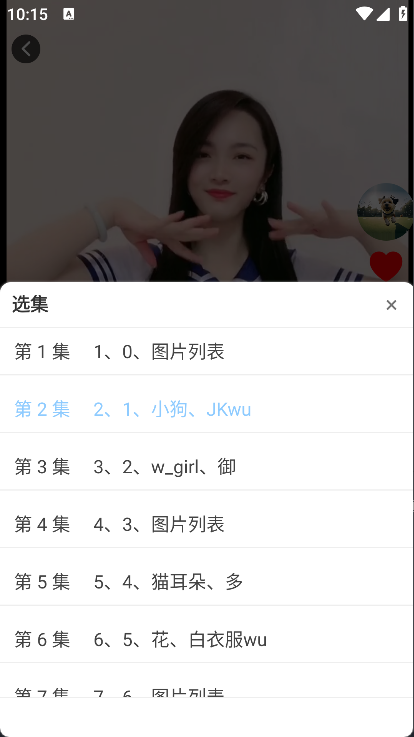
支持情况
H5浏览器:
- OPPO Android 16 :UC浏览器、夸克、OPPO自带浏览器、Chrome、FireFox、Google、Edge
- 不支持:QQ浏览器、百度浏览器[可以正常滑动播放,但会覆盖自定义内容]
- iPhone14 IOS 16:QQ浏览器、Chrome浏览器、Safari浏览器、FireFox浏览器
- 不支持:夸克[绝大多数 uniapp 组件都不支持]
- Nova HarmonyOS 2:QQ、UC浏览器、百度、夸克、Nova自带浏览器
- 特别说明:
部分浏览器不支持自动播放,需要手动播放,否则会报错;解决办法 全部静音🔕 - 如需要播放 m3u8 资源,H5端需安装 hls 库, 并放开 ml-video-player.vue 中的相关代码
小程序端:
- OPPO Android 16:支持
- iPhone14 IOS 16:支持
APP应用:
- 支持
示例说明
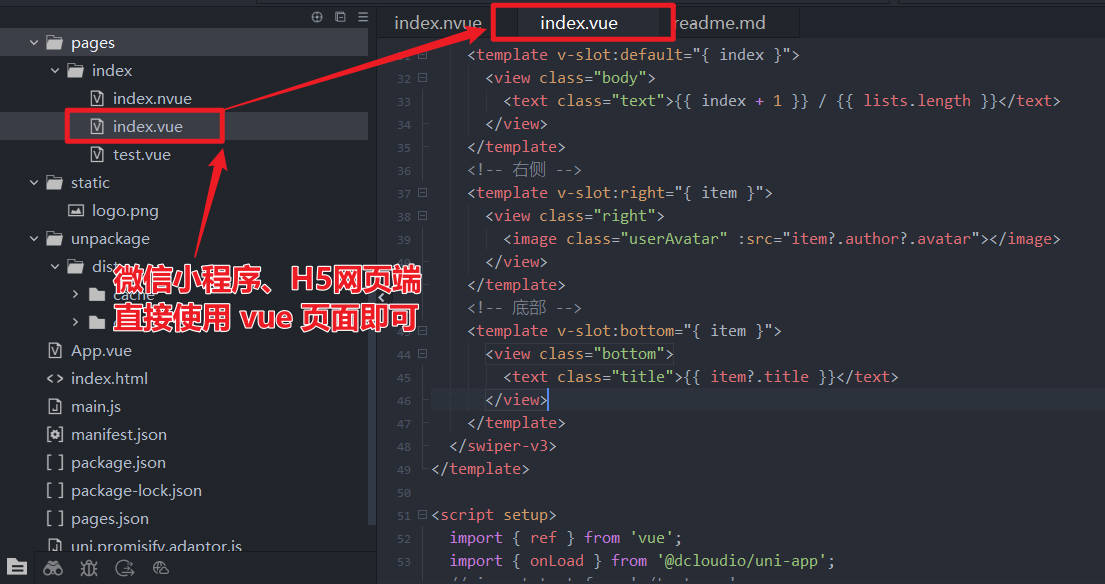 APP端需要使用nvue页面
案例中使用到了
uni-icons、uni-popup等组件,请自行安装 H5端需要安装 hls 库来支持播放m3u8资源:npm install hls.jsAPP端请使用nvue页面,将示例代码复制到nvue中即可试运行,无需其他改动
小程序说明
使用 vue2 开发 微信小程序时,无法使用 default 插槽,这是微信小程序的限制,不允许在 for 循环中使用定义插槽,否则只有一个生效。如果需要自定义内容,可以在 ml-swiper-v3 中自定义一个组件,替换掉 default 插槽即可 vue3 开发微信小程序时,没有这些限制,可以正常使用;
组件 API
Props 属性
| 属性 | 类型 | 说明 | 默认值 | 必须 |
|---|---|---|---|---|
| list | Array |
资源数据 | [] | ✅️ |
| current | Number | 当前索引 | 0 | ✅️ |
| width | Number | 组件宽度 | 可使用窗口宽度 | 否 |
| height | Number | 组件高度 | 可使用窗口高度 | 否 |
| duration | Number | 滑动动画时长,毫秒值【App不支持】 | 200 | 否 |
| criticalVal | Number | 临界值,用于控制触发加载更多事件的时机 | 3 | 否 |
| distance | Number | 滑动比例【App支持】 | 0.13 | 否 |
| auto | Boolean | 是否自动切换【H5不支持】 | false | 否 |
| showLoading | Boolean | video组件是否显示loading控件 | false | 否 |
| progress | Boolean | 是否显示进度条 | true | 否 |
| showFullScreen | Boolean | 是否显示全屏按钮【H5不支持】 | true | 否 |
| fullScreenText | String | 全屏按钮显示的内容 | 全屏观看 | 否 |
| erroeMessage | String | 资源无法播放时的提示信息 | '无法加载此视频' | 否 |
| upperTipMessage | String | 触顶提示,为空则不提示【可用于下拉刷新】 | "" | 否 |
VideoItem
| 属性名 | 类型 | 说明 | 必须 |
|---|---|---|---|
| src | String | 视频资源地址 | ✅️ |
| id | Number | String | 视频资源ID | 否 |
| title | String | 视频标题 | 否 |
| poster | String | 视频封面图 | 否 |
| [key: string] | any | 自定义任意属性 | 否 |
示例
<template>
  <ml-swiper-v3 v-model:current="current" :width="width" :height="height" :list="dataList"></ml-swiper-v3>
</template>
<script setup lang="ts">
  import { ref } from 'vue';

  const dataList = ref([]); // 实际的视频数据列表
  const current = ref(0); // 当时所在索引
  const width = ref(uni.getWindowInfo().windowWidth); // 组件宽度
  const height = ref(uni.getWindowInfo().windowHeight); // 组件高度
</script>
Events 事件
| 名称 | 说明 | 返回参数 |
|---|---|---|
| change | 上下滑动时触发 change 事件 | event.detail = { item, current, direction } |
| refresh | 下拉刷新时触发 refresh 事件(需要配置upperTipMessage) | event.detail = { current } |
| loadmore | 当剩余数据小于 criticalVal 时 触发 loadmore 事件 | event.detail = { icurrent, length, criticalVal } |
| click | 点击视频时触发 click 事件 | event.detail = { item, current, playing } |
| dblclick | 双击视频时触发 dblclick 事件 | event.detail = { item, current } |
| longTap | 长按视频时触发 longTap 事件 | event.detail = { item, current } |
| play | 视频播放【部分事件H5端无效】 | event |
| pause | 视频暂停【部分事件H5端无效】 | event |
| waiting | 视频缓冲【部分事件H5端无效】 | event |
| timeupdate | 视频进度变更【部分事件H5端无效】 | event |
| ended | 视频结束【部分事件H5端无效】 | event |
| error | 视频出错【部分事件H5端无效】 | event |
| fullscreenchange | 全屏 | 退出全屏【部分事件H5端无效】 | event |
| loadedmetadata | 加载完成【H5】【部分事件H5端无效】 | event |
| changing | 进度条拖动 | event |
| changeed | 进度条拖动结束 | event |
示例
<template>
    <ml-swiper-v3 @loadmore="handleLoadmore" @dblclick="handleOndblClick"></ml-swiper-v3>
</template>
<script setup>
  // 双击事件
  function handleOndblClick(event) {
    console.warn('ml-swiper-v3 双击事件:', event);
  }
  // 加载更多
  function handleLoadmore() {
    console.warn('ml-swiper-v3 加载更多事件');
  }
</script>
Slots 插槽
| 名称 | 说明 | 参数 |
|---|---|---|
| video | 当不使用默认 video 组件时,可以自定义 video 播放器 | #video={video、index} |
| default | 可以在视频组件中自定义想要显示的内容 | #default={video、index、style} |
| progressBar | 当不使用默认进度条时,可以自定义进度条 | #progressBar={video、index} |
示例
<template #default="{ video, styles }">
    <!-- 自定义想要显示的内容 -->
    <view :style="styles">
        <text style="color: #db693c;">{{ video.title }}</text>
    </view>
</template>
methods 方法
| 方法名 | 接收参数 | 说明 |
|---|---|---|
| setCurrent | index:Number | 动态切换视频,传入list资源列表中需要播放的视频索引 |
| pageShow | - | 从其他页面回到当前页面时 如需自动播放时,可以调用 实现自动播放 |
| pageHide | - | 从当前页面离开时,调用可以实现视频暂停播放 |
示例
  const swiperRef = ref(null); // mlSwiperV3 实例
  // 选集
  function selectIndex(index) {
    if (typeof swiperRef.value?.setCurrent == 'function') { swiperRef.value?.setCurrent(index); }
  }
  // 页面显示
  onShow(() => {
    if (typeof swiperRef.value?.pageShow == 'function') { swiperRef.value?.pageShow(); }
  });
  // 页面隐藏
  onHide(() => {
    if (typeof swiperRef.value?.pageHide == 'function') { swiperRef.value?.pageHide(); }
  });
使用示例
组件内容
组件中使用到了其他 uni-ui 的相关组件,请自行安装 uni-icons、uni-popup
<template>
  <view class="video-container">
    <!-- 分类选项卡 -->
    <ml-tabs-view :list="categories" v-model:active="activeTabIndex" @change="handleTabchange" />
    <!-- 短视频组件 -->
    <ml-swiper-v3 ref="swiperRef" v-model:current="current" :width="width" :height="height" :list="dataList"
      :auto="autoChange" upperTipMessage="到顶了,是否刷新页面数据?" @change="handleSwiperChange" @loadmore="handleLoadmore"
      @dblclick="handleOndblClick" @longTap="handleLongpress">
      <!-- 内容插槽 -->
      <template #default="{ video, styles }">
        <view v-if="video" :style="styles">
          <!-- 右侧工具栏:头像、点赞、收藏、评论、选集等 -->
          <ml-aside-tool bottom="130px" :avatar="video.author.avatar" :item="video" @click="openPopup" />
          <!-- 底部工具栏 :用户昵称、标题、时间、ip属地等-->
          <ml-bottom-tool bottom="20px" :ip="video.author.ip" :nickname="video.author.nickname" :width="styles.width"
            :date="video.dateTime" :title="video.title" :subtitle="video.described" style="pointer-events: auto;" />
          <!-- 其他自定义内容 -->
        </view>
      </template>
    </ml-swiper-v3>

    <!-- 选集弹窗 -->
    <uni-popup ref="indexPopup" type="bottom" :safeArea="false" :maskClick="false" :isMaskClick="false">
      <view class="popup-content">
        <view class="popup-header">
          <text class="popup-title">选集</text>
          <uni-icons type="close" size="24" color="#999" @click="closePopup"></uni-icons>
        </view>
        <scroll-view class="popup-list" scroll-y direction="vertical" :style="{height: (height / 2) + 'px'}">
          <view class="popup-item" v-for="index in dataList.length" :key="index" @click="selectIndex(index - 1)">
            <text :class="(index-1)===current ? 'item-active' : 'item-text'">{{ index }}</text>
          </view>
        </scroll-view>
      </view>
    </uni-popup>
  </view>
</template>
<style scoped lang="scss">
  .video-container {
    /* #ifndef APP-NVUE */
    width: 100%;
    height: 100%;
    /* #endif */
    /* #ifdef APP-NVUE */
    flex: 1;
    flex-wrap: wrap;
    flex-direction: column;
    /* #endif */
    margin: 0;
    padding: 0;
    background: #000000;
    overflow: hidden;
  }
  .popup-content {
    background-color: #fff;
    border-top-left-radius: 20rpx;
    border-top-right-radius: 20rpx;
    padding: 30rpx;
    .popup-header {
      /* #ifndef APP-NVUE */
      display: flex;
      /* #endif */
      flex-direction: row;
      align-items: center;
      justify-content: space-between;
      margin-bottom: 30rpx;
    }
    .popup-title {
      font-size: 32rpx;
      font-weight: bold;
      color: #333;
    }
    .popup-list {
      /* #ifndef APP-NVUE */
      display: flex;
      text-align-last: left;
      /* #endif */
      flex-wrap: wrap;
      flex-direction: row;
      align-items: center;
      margin-bottom: 20rpx;
      justify-content: space-between;
      .popup-item {
        /* #ifndef APP-NVUE */
        display: inline-flex;
        white-space: nowrap;
        /* #endif */
        margin-right: 20rpx;
        text-align: center;
        .item-active {
          background: rgba(85, 170, 255, 0.3);
          border-radius: 8rpx;
          border: 1px solid #55aaff;
          padding: 10rpx;
          margin: 15rpx;
          width: 40px;
          height: 30px;
          text-align: center;
        }
        .item-text {
          background: rgba(236, 236, 236, 0.3);
          border-radius: 8rpx;
          border: 1px solid #d4d4d4;
          padding: 10rpx;
          margin: 15rpx;
          width: 40px;
          height: 30px;
          text-align: center;
        }
      }
    }
  }
</style>
Vue2 示例
<script>
  import mlAsideTool from './ml-aside-tool.vue'; // 右侧侧边栏(自定义的侧边栏,没有时注释掉即可)
  import mlBottomTool from './ml-bottom-tool.vue'; // 底部内容(自定义的底部栏,没有时注释掉即可)
  export default {
    components: {
      mlAsideTool,
      mlBottomTool
    },
    data() {
      return {
        categories: [], // 上方 tab 分类组件数据
        activeTabIndex: 0, // 当前选中的 tab 分类索引
        dataList: [], // 实际的视频数据列表
        current: 0, // 当时所在索引
        autoChange: false // 是否自动切换
      }
    },
    computed: {
      pageStyle() {
        const winInfo = uni.getWindowInfo();
        return 'width:' + winInfo.windowWidth + 'px;height: ' + winInfo.windowHeight + 'px;overflow: hidden;';
      }
    },
    methods: {
      // tab滑动切换事件
      handleTabchange(event) {
        console.warn('tab滑动切换事件:', event);
      },
      // ml-swiper-v3 滑动切换事件
      handleSwiperChange(event) {
        console.warn('ml-swiper-v3 滑动切换事件:', event);
      },
      // 双击事件
      handleOndblClick(event) {
        console.warn('ml-swiper-v3 双击事件:', event);
      },
      // 长按事件
      handleLongpress(event) {
        console.warn('ml-swiper-v3 长按事件:', event);
      },
      // 加载更多
      handleLoadmore() {
        console.warn('ml-swiper-v3 加载更多事件');
      },
      // 下拉刷新
      handleRefresh() {
        console.warn('ml-swiper-v3 下拉刷新事件');
      },
      // 打开弹框
      openPopup() {
        this.$refs.indexPopup.open();
      },
      // 关闭弹框
      closePopup() {
        this.$refs.indexPopup.close();
      },
      // 选集
      selectIndex(index) {
        if (index > 0 && index < this.dataList.length && index === this.current) {
          return;
        }
        if (typeof this.$refs.swiperRef.setCurrent == 'function') {
          this.$refs.swiperRef.setCurrent(index);
          this.closePopup();
        }
      }
    },
    onLoad() {
      this.categories = getTabList(); // 请使用下方的测试数据
      this.dataList = getDataList(40); // 请使用下方的测试数据
    },
    onShow() {
      if (typeof this.$refs.swiperRef.pageShow == 'function') {
        this.$refs.swiperRef.pageShow();
      }
    },
    onHide() {
      if (typeof this.$refs.swiperRef.pageHide == 'function') {
        this.$refs.swiperRef.pageHide();
      }
    }
  }
</script>
Vue3 示例
<script setup lang="ts">
  import mlAsideTool from './ml-aside-tool.vue'; // 右侧侧边栏(自定义的侧边栏,没有时注释掉即可)
  import mlBottomTool from './ml-bottom-tool.vue'; // 底部内容(自定义的底部栏,没有时注释掉即可)

  import { computed, ref } from 'vue';
  import { onLoad, onShow, onHide } from '@dcloudio/uni-app';

  const { value: { windowWidth: width, windowHeight: height } } = computed(() => uni.getWindowInfo());
  const pageStyle = computed(() => ('width:' + width + 'px;height: ' + height + 'px;overflow: hidden;'));

  const categories = ref([]); // 上方 tab 分类组件数据
  const activeTabIndex = ref(0); // 当前选中的 tab 分类索引
  const dataList = ref([]); // 实际的视频数据列表
  const current = ref(0);
  const autoChange = ref(false);

  const indexPopup = ref(null);
  const swiperRef = ref<InstanceType<mlSwiperV3>>(null);

  // tab滑动切换事件
  const handleTabchange = (event : any) => {
    console.log('tab滑动切换事件:', event);
  };
  // ml-swiper-v3 滑动切换事件
  function handleSwiperChange(event : any) {
    console.warn('ml-swiper-v3 滑动切换事件:', event);
    current.value = event.index;
  }
  // 双击事件
  function handleOndblClick(event : any) {
    console.warn('ml-swiper-v3 双击事件:', event);
  }
  // 长按事件
  function handleLongpress(event : any) {
    console.warn('ml-swiper-v3 长按事件:', event);
  }
  // 加载更多
  function handleLoadmore() {
    console.warn('ml-swiper-v3 加载更多事件');
  }
  // 打开弹框
  function openPopup() {
    indexPopup.value?.open();
  }
  // 关闭弹框
  function closePopup() {
    indexPopup.value?.close();
  }
  // 选集
  function selectIndex(index : number) {
    if (index > 0 && index < dataList.value.length && index === current.value) { return; }
    if (typeof swiperRef.value?.setCurrent == 'function') {
      swiperRef.value?.setCurrent(index);
      closePopup();
    }
  }
  // 页面显示
  onShow(() => {
    if (typeof swiperRef.value?.pageShow == 'function') { swiperRef.value?.pageShow(); }
  });
  // 页面隐藏
  onHide(() => {
    if (typeof swiperRef.value?.pageHide == 'function') { swiperRef.value?.pageHide(); }
  });
  // 页面加载
  onLoad(() => {
    categories.value = getTabList(); // 请使用下方的测试数据
    dataList.value = getDataList(40); // 请使用下方的测试数据
  });
</script>
完整示例
<template>
  <view class="video-container" :style="pageStyle">
    <!-- 分类选项卡 -->
    <ml-tabs-view :list="categories" v-model:active="activeTabIndex" @change="handleTabchange" />
    <!-- 短视频组件 -->
    <ml-swiper-v3 ref="swiperRef" v-model:current="current" :width="width" :height="height" :list="dataList"
      :auto="autoChange" upperTipMessage="到顶了,是否刷新页面数据?" @change="handleSwiperChange" @loadmore="handleLoadmore"
      @dblclick="handleOndblClick" @longTap="handleLongpress">
      <!-- 内容插槽 -->
      <template #default="{ video, styles }">
        <view v-if="video" :style="styles">
          <!-- 右侧工具栏:头像、点赞、收藏、评论、选集等 -->
          <ml-aside-tool v-if="video && video.author" bottom="130px" :avatar="video.author.avatar" :item="video" @click="openPopup" />
          <!-- 底部工具栏 :用户昵称、标题、时间、ip属地等-->
          <ml-bottom-tool v-if="video && video.author" bottom="20px" :ip="video.author.ip" :nickname="video.author.nickname" :width="width"
            :date="video.dateTime" :title="video.title" :subtitle="video.described" style="pointer-events: auto;" />
          <!-- 其他自定义内容 -->
        </view>
      </template>
    </ml-swiper-v3>

    <!-- 选集弹窗 -->
    <uni-popup ref="indexPopup" type="bottom" :safeArea="false" :maskClick="false" :isMaskClick="false">
      <view class="popup-content">
        <view class="popup-header">
          <text class="popup-title">选集</text>
          <uni-icons type="close" size="24" color="#999" @click="closePopup"></uni-icons>
        </view>
        <scroll-view class="popup-list" scroll-y direction="vertical" :style="{height: (height / 2) + 'px'}">
          <view class="popup-item" v-for="index in dataList.length" :key="index" @click="selectIndex(index - 1)">
            <text :class="(index-1)===current ? 'item-active' : 'item-text'">{{ index }}</text>
          </view>
        </scroll-view>
      </view>
    </uni-popup>
  </view>
</template>

<script>
  export default {
    data() {
      return {
        categories: [], // 上方 tab 分类组件数据
        activeTabIndex: 0, // 当前选中的 tab 分类索引
        dataList: [], // 实际的视频数据列表
        current: 0, // 当时所在索引
        autoChange: false,// 是否自动切换
        width: uni.getWindowInfo().windowWidth,
        height: uni.getWindowInfo().windowHeight,
      }
    },
    computed: {
      pageStyle() { return 'width:' + this.width + 'px;height: ' + this.height + 'px;overflow: hidden;'; },
    },
    methods: {
      // tab滑动切换事件
      handleTabchange(event) {
        console.warn('tab滑动切换事件:', event);
      },
      // ml-swiper-v3 滑动切换事件
      handleSwiperChange(event) {
        console.warn('ml-swiper-v3 滑动切换事件:', event);
      },
      // 双击事件
      handleOndblClick(event) {
        console.warn('ml-swiper-v3 双击事件:', event);
      },
      // 长按事件
      handleLongpress(event) {
        console.warn('ml-swiper-v3 长按事件:', event);
      },
      // 加载更多
      handleLoadmore() {
        console.warn('ml-swiper-v3 加载更多事件');
      },
      // 下拉刷新
      handleRefresh() {
        console.warn('ml-swiper-v3 下拉刷新事件');
      },
      // 打开弹框
      openPopup() {
        const popupRef = this.$refs?.indexPopup;
        popupRef && popupRef?.open();
      },
      // 关闭弹框
      closePopup() {
        const popupRef = this.$refs?.indexPopup;
        popupRef && popupRef?.close();
      },
      // 选集
      selectIndex(index) {
        if (index > 0 && index < this.dataList.length && index === this.current) {
          return;
        }
        const swiperRef = this.$refs?.swiperRef;
        if (swiperRef && typeof swiperRef?.setCurrent == 'function') {
          swiperRef?.setCurrent(index);
          this.closePopup();
        }
      }
    },
    onLoad() {
      this.categories = getTabList(); // 请使用下方的测试数据
      this.dataList = getDataList(40); // 请使用下方的测试数据
    },
    onShow() {
      const swiperRef = this.$refs?.swiperRef;
      if (swiperRef && typeof swiperRef?.pageShow == 'function') {
        swiperRef?.pageShow();
      }
    },
    onHide() {
      const swiperRef = this.$refs?.swiperRef;
      if (swiperRef && typeof swiperRef?.pageHide == 'function') {
        swiperRef?.pageHide();
      }
    }
  }

  // 生成 tab 列表数据
  function getTabList() {
    return [
      { value: 'recommend', label: '推荐' },
      { value: 'tech', label: '科技' },
      { value: 'design', label: '设计' },
      { value: 'programming', label: '编程' },
      { value: 'ai', label: '人工智能' },
      { value: 'mobile', label: '移动开发' },
      { value: 'web', label: 'Web开发' },
      { value: 'data', label: '数据分析' },
      { value: 'product', label: '产品设计' },
      { value: 'startup', label: '创业' }
    ];
  }

  // 生成测试数据
  function getDataList(length = 40) {
    function getUrl(index) {
      const VIDEO_LIST = [
        "https://txmov2.a.yximgs.com/upic/2020/11/08/19/BMjAyMDExMDgxOTQxNTlfNTIzNDczMzQ0XzM4OTQ1MDk5MTI4XzFfMw==_b_Bc770a92f0cf153407d60a2eddffeae2a.mp4",
        "https://txmov6.a.yximgs.com/upic/2020/08/23/00/BMjAyMDA4MjMwMDMyNDRfMTYzMzY5MDA0XzM0ODI4MDcyMzQ5XzFfMw==_b_B9a1c9d4e3a090bb2815994d7f33a906a.mp4",
        "https://txmov2.a.yximgs.com/upic/2020/10/02/09/BMjAyMDEwMDIwOTAwMDlfMTIyMjc0NTk0Ml8zNjk3Mjg0NjcxOF8xXzM=_b_B28a4518e86e2cf6155a6c1fc9cf79c6d.mp4",
      ];
      if (VIDEO_LIST.length > index) {
        return VIDEO_LIST[index];
      }
      return VIDEO_LIST[index % VIDEO_LIST.length];
    }

    return Array.from({ length: length }, (_, i) => ({
      id: 'abc_' + i,
      poster: '',
      title: i + ' | 测试_抖音短视频(超高性能)H5、APP、小程序全端支持,丝滑切换视频效果 ,无限数据加载不卡顿,进度条、m3u8、全屏、自动切换等...',
      src: getUrl(i),
      described: i + '_简介_测试_抖音短视频(超高性能)H5、APP、小程序全端支持,可0配置,抖音短视频,丝滑切换视频效果 ,无限数据加载不卡顿,进度条、m3u8、全屏、自动切换等...',
      dateTime: "2026-01-01",
      durationTime: '13:14',
      likes: Math.floor(Math.random() * 999 + 1),
      stars: Math.floor(Math.random() * 999 + 1),
      shares: Math.floor(Math.random() * 999 + 1),
      comments: Math.floor(Math.random() * 999 + 1),
      author: {
        ip: '上海',
        nickname: '测试_' + i,
        avatar: 'https://picsum.photos/100/100?' + Math.random(),
      }
    }));
  }
</script>

<style scoped lang="scss">
  .video-container {
    /* #ifndef APP-NVUE */
    width: 100%;
    height: 100%;
    /* #endif */
    /* #ifdef APP-NVUE */
    flex: 1;
    flex-wrap: wrap;
    flex-direction: column;
    /* #endif */
    margin: 0;
    padding: 0;
    background: #000000;
    overflow: hidden;
  }

  .popup-content {
    background-color: #fff;
    border-top-left-radius: 20rpx;
    border-top-right-radius: 20rpx;
    padding: 30rpx;

    .popup-header {
      /* #ifndef APP-NVUE */
      display: flex;
      /* #endif */
      flex-direction: row;
      align-items: center;
      justify-content: space-between;
      margin-bottom: 30rpx;
    }

    .popup-title {
      font-size: 32rpx;
      font-weight: bold;
      color: #333;
    }

    .popup-list {
      /* #ifndef APP-NVUE */
      display: flex;
      text-align-last: left;
      /* #endif */
      flex-wrap: wrap;
      flex-direction: row;
      align-items: center;
      margin-bottom: 20rpx;
      justify-content: space-between;

      .popup-item {
        /* #ifndef APP-NVUE */
        display: inline-flex;
        white-space: nowrap;
        /* #endif */
        margin-right: 20rpx;
        text-align: center;

        .item-active {
          background: rgba(85, 170, 255, 0.3);
          border-radius: 8rpx;
          border: 1px solid #55aaff;
          padding: 10rpx;
          margin: 15rpx;
          width: 40px;
          height: 30px;
          text-align: center;
        }

        .item-text {
          background: rgba(236, 236, 236, 0.3);
          border-radius: 8rpx;
          border: 1px solid #d4d4d4;
          padding: 10rpx;
          margin: 15rpx;
          width: 40px;
          height: 30px;
          text-align: center;
        }
      }
    }
  }
</style>
测试数据
  // 生成 tab 列表数据
  function getTabList() {
    return [
      { value: 'recommend', label: '推荐' },
      { value: 'tech', label: '科技' },
      { value: 'design', label: '设计' },
      { value: 'programming', label: '编程' },
      { value: 'ai', label: '人工智能' },
      { value: 'mobile', label: '移动开发' },
      { value: 'web', label: 'Web开发' },
      { value: 'data', label: '数据分析' },
      { value: 'product', label: '产品设计' },
      { value: 'startup', label: '创业' }
    ];
  }

  // 生成测试数据
  function getDataList(length = 40) {
    function getUrl(index) {
      const VIDEO_LIST = [
        "https://txmov2.a.yximgs.com/upic/2020/11/08/19/BMjAyMDExMDgxOTQxNTlfNTIzNDczMzQ0XzM4OTQ1MDk5MTI4XzFfMw==_b_Bc770a92f0cf153407d60a2eddffeae2a.mp4",
        "https://txmov6.a.yximgs.com/upic/2020/08/23/00/BMjAyMDA4MjMwMDMyNDRfMTYzMzY5MDA0XzM0ODI4MDcyMzQ5XzFfMw==_b_B9a1c9d4e3a090bb2815994d7f33a906a.mp4",
        "https://txmov2.a.yximgs.com/upic/2020/10/02/09/BMjAyMDEwMDIwOTAwMDlfMTIyMjc0NTk0Ml8zNjk3Mjg0NjcxOF8xXzM=_b_B28a4518e86e2cf6155a6c1fc9cf79c6d.mp4",
      ];
      if (VIDEO_LIST.length > index) {
        return VIDEO_LIST[index];
      }
      return VIDEO_LIST[index % VIDEO_LIST.length];
    }

    return Array.from({ length: length }, (_, i) => ({
      id: 'abc_' + i,
      poster: 'https://picsum.photos/100/100?' + Math.random(),
      title: i + ' | 测试_抖音短视频(超高性能)H5、APP、小程序全端支持,丝滑切换视频效果 ,无限数据加载不卡顿,进度条、m3u8、全屏、自动切换等...',
      src: getUrl(i),
      described: i + '_简介_测试_抖音短视频(超高性能)H5、APP、小程序全端支持,可0配置,抖音短视频,丝滑切换视频效果 ,无限数据加载不卡顿,进度条、m3u8、全屏、自动切换等...',
      dateTime: "2026-01-01",
      durationTime: '13:14',
      likes: Math.floor(Math.random() * 999 + 1),
      stars: Math.floor(Math.random() * 999 + 1),
      shares: Math.floor(Math.random() * 999 + 1),
      comments: Math.floor(Math.random() * 999 + 1),
      author: {
        ip: '上海',
        nickname: '测试_' + i,
        avatar: 'https://picsum.photos/100/100?' + Math.random(),
      }
    }));
  }
相关组件
分类组件
<template>
  <scroll-view class="scroll-x" :scroll-x="true" :scroll-left="scrollLeft" :style="scrollStyle" :show-scrollbar="false"
    scroll-with-animation enable-flex>
    <view v-for="(item, index) in list" :key="item.label"
      :class="active === index ? 'scroll-view active' : 'scroll-view'" @tap="click(item, index)">
      <text class="text" :style="active === index ? activeText : 'color: #fff;font-weight: 400;'">
        {{ item.label }}
      </text>
    </view>
  </scroll-view>
</template>

<script>
  export default {
    name: "ml-tabs-view",
    props: {
      list: { type: Array, default: [] },
      statusbar: { type: Boolean, default: true },
      active: { type: Number, default: -1 },
      background: { type: String, default: 'transparent' },
      moveX: { type: Number, default: 80 },
    },
    emits: ['update:active', 'change'],
    data() {
      return {};
    },
    computed: {
      scrollStyle() {
        let statusBarHeight = this.statusbar ? uni.getWindowInfo().statusBarHeight : 0;
        return "white-space:nowrap;padding-top:" + statusBarHeight + "px;";
      },
      activeText() { return "color: #55aaff; font-weight: 600;"; },
      scrollLeft() { return Math.max(this.moveX * (this.active - 4), 0); },
    },
    methods: {
      click(item, index) {
        if (index !== this.active) {
          this.$emit('update:active', index);
          this.$emit('change', { item, index });
        }
      }
    },
  }
</script>

<style scoped lang="scss">
  .scroll-x {
    position: fixed;
    top: 10px;
    left: 0;
    /* #ifndef APP-NVUE */
    display: flex;
    /* #endif */
    /* #ifdef MP-WEIXIN */
    height: 90px;
    /* #endif */
    padding: 5px 0;
    flex-wrap: nowrap;
    flex-direction: row;
    z-index: 999;
  }

  .scroll-view {
    /* #ifndef APP-NVUE */
    display: inline-block;
    /* #endif */
    height: 25px;
    padding-top: 10px;
    margin: 4rpx 8rpx;
    padding: 4rpx 8rpx;
  }

  .active {
    font-weight: 600;
    border-bottom: 4rpx solid #55aaff;
  }

  .text {
    color: #fff;
    text-align: center;
  }
</style>
侧边栏
说明:此组件仅为实现功能,实际使用时请自行实现
<template>
  <view class="aside-tool" :style="{ bottom: bottom }">
    <view class="aside-header">
      <image :src="avatar" mode="aspectFit" class="avatar" @tap="avatarClick"></image>
      <view class="aside-plus" v-if="!state.isFollowed">
        <uni-icons type="plus-filled" color="#f92672" :size="23" @tap="addFollow" />
      </view>
    </view>
    <view class="item">
      <uni-icons type="heart-filled" :size="32" :color="loveColor" @click="click($event, 'like')" />
      <text class="text line-1">{{ formatNum(state.likes) }}</text>
    </view>
    <view class="item">
      <uni-icons type="chat-filled" :size="32" color="#fff" @click="click($event, 'comment')" />
      <text class="text line-1">{{ formatNum(state.comments) }}</text>
    </view>
    <view class="item">
      <uni-icons type="star-filled" :size="32" :color="starColor" @click="click($event, 'star')" />
      <text class="text line-1">{{ formatNum(state.stars) }}</text>
    </view>
    <view class="item">
      <uni-icons type="redo-filled" :size="32" color="#fff" @click="click($event, 'share')" />
      <text class="text line-1">{{ formatNum(state.shares) }}</text>
    </view>
    <view class="item">
      <uni-icons type="list" :size="32" color="#fff" @click="click($event, 'list')" />
      <text class="text line-1">选集</text>
    </view>
  </view>
</template>

<script>
  export default {
    name: 'ml-aside-tool',
    props: {
      item: { type: Object, default: () => ({}) },
      avatar: { type: String, default: () => ('') },
      bottom: { type: String, default: () => ('0px') }
    },
    emits: ['update:item', 'openComments', 'avatarClick', 'addFollow', 'shares', 'click'],
    data() {
      return {
        state: {
          /** 是否喜欢 */
          isLike: false,
          /** 是否收藏 */
          isStar: false,
          /** 是否关注 */
          isFollowed: false,
          /** 点赞数 */
          likes: 0,
          /** 收藏数 */
          stars: 0,
          /** 分享数 */
          shares: 0,
          /** 评论数 */
          comments: 0,
        }
      }
    },
    computed: {
      loveColor() { return this.state.isLike ? '#f92672' : '#fff'; },
      starColor() { return this.state.isStar ? '#e6db74' : '#fff'; }
    },
    watch: {
      item: {
        handler(newVal) {
          this.state.isLike = !!newVal.isLoved;
          this.state.isStar = !!newVal.isCollect;
          this.state.isFollowed = !!newVal.isFollowed;
          this.state.likes = this.noneEmpty(newVal.likes);
          this.state.stars = this.noneEmpty(newVal.stars);
          this.state.shares = this.noneEmpty(newVal.shares);
          this.state.comments = this.noneEmpty(newVal.comments);
        },
        immediate: true, deep: true
      }
    },
    methods: {
      avatarClick(event) {
        event?.preventDefault && event?.preventDefault();
        this.$emit('avatarClick', this.item);
      },
      addFollow() {
        uni.showToast({ title: '已添加关注' });
        const item = this.item;
        item.isFollowed = true;
        this.$emit('update:item', item);
      },
      goToShare() {
        this.$emit('shares', this.item)
      },
      openComments(item) {
        this.$emit('openComments', item)
      },
      click(event, type) {
        if (typeof event?.preventDefault == 'function') { event.preventDefault(); }
        if (typeof event?.stopPropagation == 'function') { event.stopPropagation(); }
        if (type === 'like') { return this.addLoved(this.item); }
        if (type === 'star') { return this.addStared(this.item); }
        if (type === 'comment') { return this.openComments(this.item); }
        if (type === 'share') { return this.goToShare(); }
        if (type === 'list') { return this.$emit('click', event, type); }
      },
      formatNum(val) {
        val = Number(val);
        if (isNaN(val) || val < 1) { return val || '0'; }
        if (val < 10000) { return val; }
        const newVal = (val / 10000) + '';
        const index = newVal.lastIndexOf('.');
        if (index > -1) {
          return Number(newVal.substring(0, index + 2)) + 'w';
        }
        return Number(newVal) + 'w';
      },
      addLoved(item) {
        if (!item) { return; }
        item.isLoved = !item.isLoved;
        this.$emit('update:item', item);
      },
      addStared(item) {
        if (!item) { return; }
        item.isCollect = !item.isCollect;
        this.$emit('update:item', item);
      },
      noneEmpty(val) {
        if (!val || val == '' || val == undefined || val == null) return 0;
        if (typeof val === 'number') return val <= 0 ? 0 : val;
        if (typeof val === 'string') {
          let num = Number(val.trim());
          if (!isNaN(num) && num > 0) return num;
          num = parseInt(val.trim());
          return num > 0 ? val : 0;
        }
        return 0;
      }
    }
  }
</script>

<style scoped lang="scss">
  .aside-tool {
    position: absolute;
    right: 0;
    bottom: 0;
    padding: 10px 8px;
    /* #ifndef APP-NVUE */
    display: flex;
    /* #endif */
    flex-wrap: wrap;
    align-items: center;
    flex-direction: column;
    justify-content: center;
    z-index: 999;

    .item {
      margin-bottom: 10px;

      .text {
        color: #fff;
        font-size: 11px;
        text-align: center;
      }
    }
  }

  .line-1 {
    /* #ifdef APP-PLUS */
    lines: 1; // 1或n
    text-overflow: ellipsis;
    /* #endif */
    /* #ifndef APP-PLUS */
    overflow: hidden;
    -webkit-line-clamp: 1;
    display: -webkit-box;
    text-overflow: ellipsis;
    word-wrap: break-word;
    white-space: normal !important;
    -webkit-box-orient: vertical;
    /* #endif */
  }

  .aside-header {
    position: relative;
    top: 0;
    right: 0;
    z-index: 999;

    .avatar {
      width: 100rpx;
      height: 100rpx;
      border-radius: 100;
      /* #ifndef APP-NVUE */
      border-radius: 100%;
      /* #endif */
      margin-bottom: 10px;
      border: 5rpx solid white;
    }

    .aside-plus {
      position: absolute;
      bottom: 0rpx;
      width: 100rpx;
      /* #ifndef APP-NVUE */
      display: flex;
      /* #endif */
      align-items: center;
      justify-content: center;
      z-index: 999;
    }
  }
</style>
底部栏
说明:此组件仅为实现功能,实际使用时请自行实现
<template>
  <view class="bottom-tool" :style="{ width, bottom: bottom }">
    <view class="nickname">
      <text class="text line-1" v-if="nickname"> @{{ nickname || '' }} </text>
    </view>
    <view class="subcontext">
      <text class="subtext line-1"> {{ ip }} {{ date }} </text>
    </view>
    <view class="content">
      <text class="text line-3"> {{ title }} </text>
    </view>
  </view>
</template>
<script>
  export default {
    name: 'ml-bottom-tool',
    props: {
      /** 组件宽度 */
      width: { type: String, default: () => ('') },
      /** ip属地 */
      ip: { type: String, default: () => ('') },
      /** 用户昵称 */
      nickname: { type: String, default: () => ('') },
      /** 发布时间 */
      date: { type: String, default: () => ('') },
      /** 标题 */
      title: { type: String, default: () => ('') },
      /** 副标题 */
      subtitle: { type: String, default: () => ('') },
      /* 距离底部距离 **/
      bottom: { type: String, default: () => ('0px') },
    }
  }
</script>
<style scoped lang="scss">
  .bottom-tool {
    position: absolute;
    left: 0;
    bottom: 0;
    padding: 15px 0;
    /* #ifndef APP-NVUE */
    display: flex;
    /* #endif */
    flex-wrap: wrap;
    flex-direction: column;
    z-index: 90;

    .nickname {
      margin: 3px 8px;
      /* #ifndef APP-NVUE */
      color: #fff;

      /* #endif */
      .text {
        font-size: 14px;
        text-align: left;
        color: #fff;
        font-weight: 600;
      }
    }

    .subcontext {
      margin: 3px 8px;
      /* #ifndef APP-NVUE */
      color: #f5f5f5;

      /* #endif */
      .subtext {
        font-size: 12px;
        color: #f5f5f5;
        font-weight: 300;
      }
    }

    .content {
      margin: 3px 8px;
      /* #ifndef APP-NVUE */
      color: #fff;

      /* #endif */
      .text {
        font-size: 14px;
        color: #fff;
        text-align: left;
        font-weight: 300;
      }
    }
  }

  .line-1 {
    /* #ifdef APP-PLUS */
    lines: 1;
    text-overflow: ellipsis;
    /* #endif */
    /* #ifndef APP-PLUS */
    overflow: hidden;
    -webkit-line-clamp: 1;
    display: -webkit-box;
    text-overflow: ellipsis;
    word-wrap: break-word;
    white-space: normal !important;
    -webkit-box-orient: vertical;
    /* #endif */
  }

  .line-3 {
    /* #ifdef APP-PLUS */
    lines: 3;
    text-overflow: ellipsis;
    /* #endif */
    /* #ifndef APP-PLUS */
    overflow: hidden;
    -webkit-line-clamp: 3;
    display: -webkit-box;
    text-overflow: ellipsis;
    word-wrap: break-word;
    white-space: normal !important;
    -webkit-box-orient: vertical;
    /* #endif */
  }
</style>


 下载 1088
 赞赏 0
赞赏 0


 下载 12598328
 赞赏 1949





























 赞赏
赞赏

 京公网安备:11010802035340号