更新记录
1.0.1(2026-05-19)
下载此版本
新增图片光标效果
1.0.0(2026-05-12)
下载此版本
实现打字机效果
平台兼容性
uni-app(4.01)
| Vue2 |
Vue2插件版本 |
Vue3 |
Vue3插件版本 |
Chrome |
Safari |
app-vue |
app-vue插件版本 |
app-nvue |
Android |
Android插件版本 |
iOS |
iOS插件版本 |
鸿蒙 |
| √ |
1.0.0 |
√ |
1.0.0 |
√ |
√ |
√ |
1.0.0 |
- |
√ |
1.0.0 |
√ |
1.0.0 |
√ |
| 微信小程序 |
支付宝小程序 |
抖音小程序 |
百度小程序 |
快手小程序 |
京东小程序 |
鸿蒙元服务 |
QQ小程序 |
飞书小程序 |
小红书小程序 |
快应用-华为 |
快应用-联盟 |
| √ |
√ |
√ |
- |
√ |
- |
- |
√ |
- |
- |
- |
- |
six-typewriter打字机效果
six-typewriter实现打字机效果,可自定义闪烁光标及颜色等。
1. 基础使用
<template>
    <view class="pages">
        <view class="box">
            <six-typewriter ref="typewriterRef" :text="textVal"></six-typewriter>
        </view>
        <view class="box">
            <six-typewriter ref="typewriterRef2" :text="textVal2" :cursorImg="cursorImg"></six-typewriter>
        </view>
        <view class="box">
            <six-typewriter ref="typewriterRef1" :textStyle="textStyle" :cursorStyle="cursorStyle" :text="textVal1" cursorSymbol="·"></six-typewriter>
        </view>
        <view @click="butFun" class="but">重新动画</view>
    </view>
</template>

<script>
    export default {
        data() {
            return {
                cursorImg:'/static/lizhi.png',
                textVal:`默认打字机效果
                光标符号默认|颜色默认`,
                textVal1:'',
                textVal2:`打字机效果自定义光标图片
                支持自定义光标图片,光标图片尺寸`,
                textStyle:{
                    color:'#f00',
                    fontSize:'40rpx'
                },
                cursorStyle:{
                    color:'green',
                    fontSize:'40rpx',
                    fontWeight:'bold',
                    lineHeight:'40rpx'
                }
            }
        },
        onLoad() {
            let _this = this
            setTimeout(function(){
                _this.textVal1 = `自定义打字机效果
                支持自定义光标符号,光标颜色及字体大小`
            },2000)
        },
        methods: {
            butFun(){
                this.$refs.typewriterRef.startPrint()
                this.$refs.typewriterRef1.startPrint()
                this.$refs.typewriterRef2.startPrint()
            },
        }
    }
</script>

<style lang="scss" scoped>
    .pages {
        height: 100vh;
        width: 100vw;
    }

    .box{
        width: calc(96% - 40rpx);
        padding: 20rpx;
        background-color: #f9f9f9;
        border-radius: 20rpx;
        margin: 20rpx 2%;
    }

    .but{
        margin-top: 20rpx;
        background-color: #409EFF;
        height: 100rpx;
        display: flex;
        align-items: center;
        justify-content: center;
        width: 96%;
        margin-left: 2%;
        border-radius: 20rpx;
        color: #fff;
        font-size: 30rpx;
        font-weight: bold;
    }
</style>
2. prop属性说明
| 属性名 |
类型 |
默认值 |
说明 |
| speed |
Number, String |
150 |
打字速度,单位毫秒 |
| text |
String |
0 |
展示的文字 |
| textStyle |
Object |
color:'#000',fontSize:'28rpx' |
展示的文字样式,支持style对象语法 |
| cursor |
Boolean |
true |
光标闪烁状态,是否开启闪烁光标功能 |
| cursorSymbol |
String |
' |
' |
闪烁光标效果 |
| cursorStyle |
Object |
color:'#000',fontSize:'28rpx' |
闪烁光标样式,支持style对象语法 |
| cursorImg |
String |
'' |
支持本地图片和网络图片本地图片需放在static文件夹下如(/static/lizhi.png) |
| width |
String |
'20rpx' |
图片光标宽度,支持20rpx,20px等多种写法 |
| height |
String |
'20rpx' |
图片光标高度,支持20rpx,20px等多种写法 |
3. sixCountUp Methods
| 方法名称 |
说明 |
| startPrint |
执行打字机动画效果 |
| resetPrint |
停止打字机动画效果 |
4. Popup Events
| 方法名称 |
说明 |
| finishedTyping |
完成打印回调 |
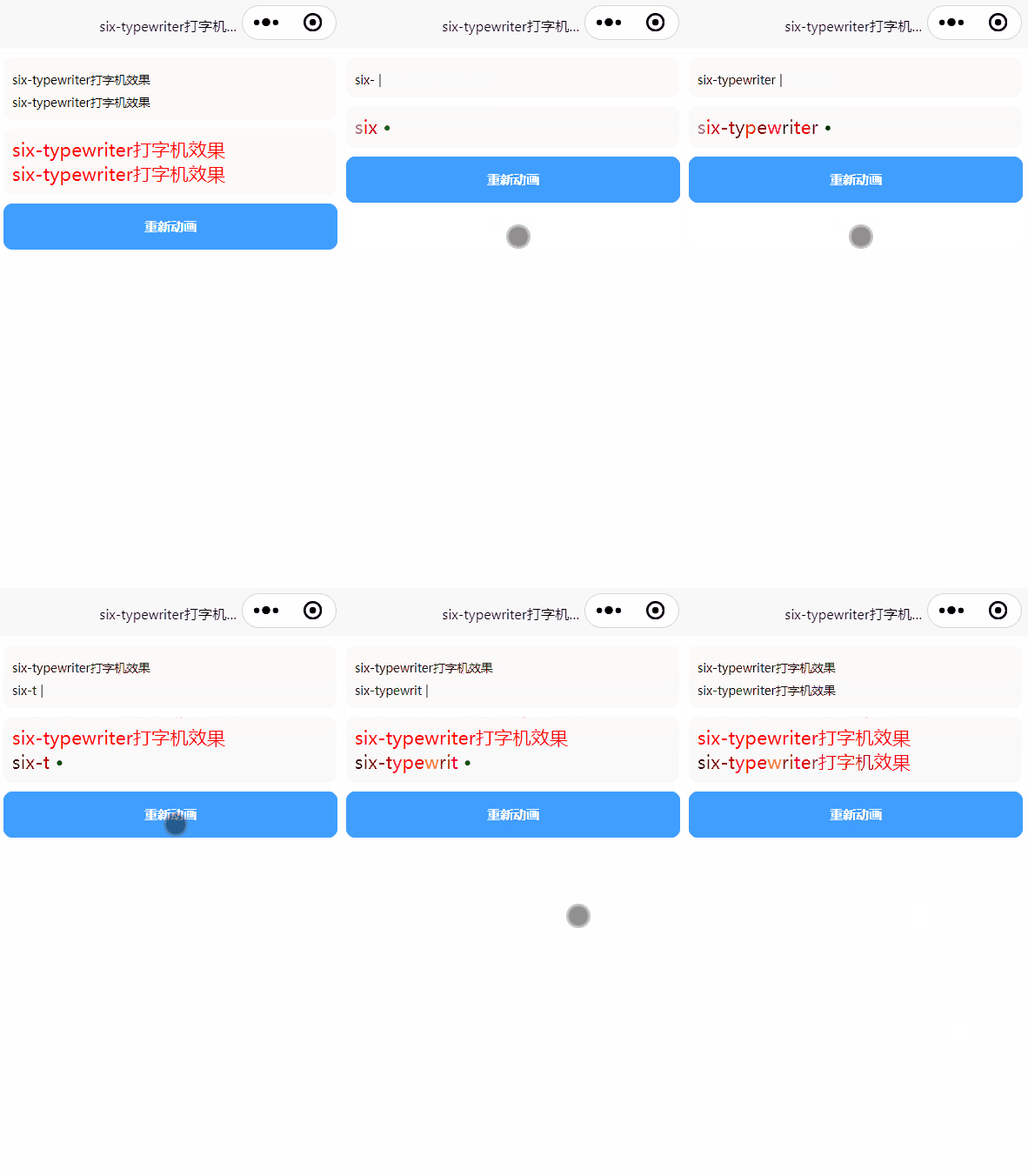
5. 效果预览



 收藏人数:
收藏人数:
 下载插件并导入HBuilderX
 下载示例项目ZIP
 赞赏(0)
赞赏(0)

 下载 9
下载 9
 赞赏 0
赞赏 0


 下载 12641191
 赞赏 1950





























 赞赏
赞赏

 京公网安备:11010802035340号