


 收藏人数:
收藏人数:
 购买普通授权版(
 试用
试用
 赞赏(0)
赞赏(0)
更新记录
1.0.0(2026-08-26)
修复BUG
平台兼容性
uni-app(5.13)
| Vue2 | Vue3 | Chrome | Safari | app-vue | app-nvue | Android | iOS | 鸿蒙 |
|---|---|---|---|---|---|---|---|---|
| - | - | - | - | √ | √ | √ | √ | - |
| 微信小程序 | 支付宝小程序 | 抖音小程序 | 百度小程序 | 快手小程序 | 京东小程序 | 鸿蒙元服务 | QQ小程序 | 飞书小程序 | 小红书小程序 | 快应用-华为 | 快应用-联盟 |
|---|---|---|---|---|---|---|---|---|---|---|---|
| - | - | - | - | - | - | - | - | - | - | - | - |
其他
| 多语言 | 暗黑模式 | 宽屏模式 | 蒸汽模式 |
|---|---|---|---|
| √ | √ | √ | √ |
HT-BaiChuan 使用说明
阿里百川电商套件 UTS 插件,封装淘宝授权登录、电商页面唤起、淘宝客授权等能力。
- 插件 ID:
ht-baichuan- 版本:
1.0.0- 支持平台:App-Android、App-iOS(uni-app / uni-app x,Vue2/Vue3/nvue 均支持)
- 系统要求:Android minSdkVersion 21 / iOS deploymentTarget 13.0
- HBuilderX:
^3.6.7,uni-app:^5.13
初始化配置
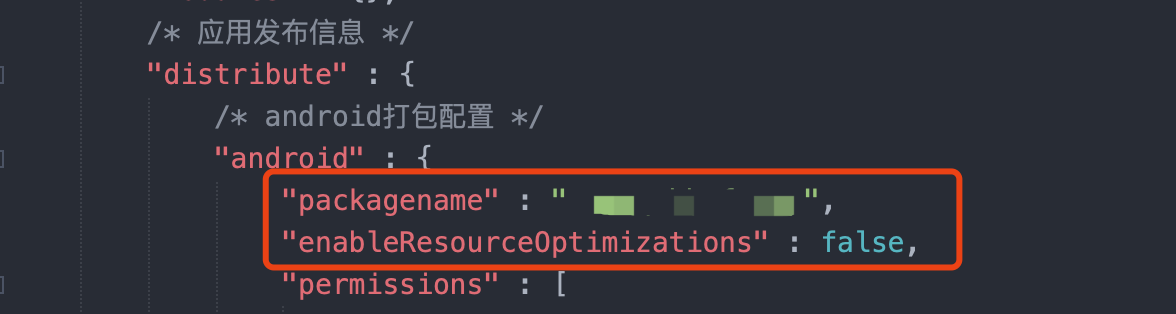 修改自己的安卓项目配置,禁止压缩素材
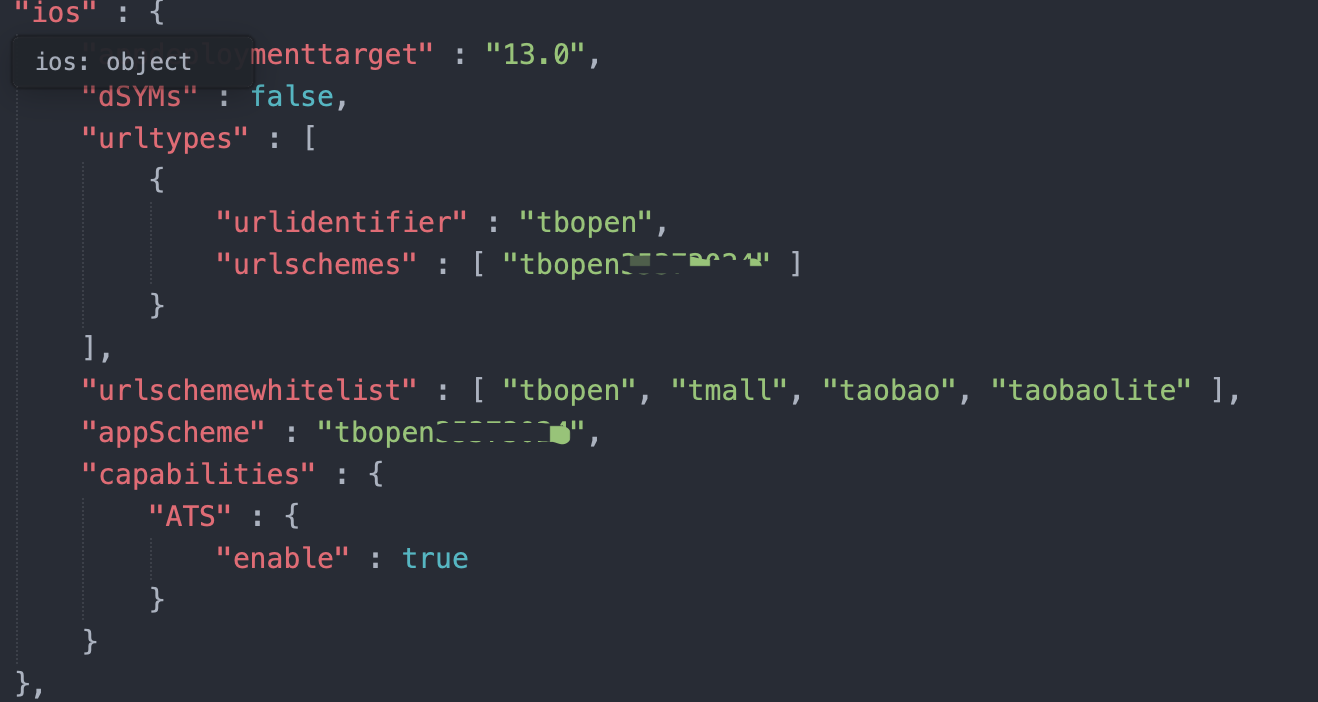 schemes 是 tbopen{appkey}
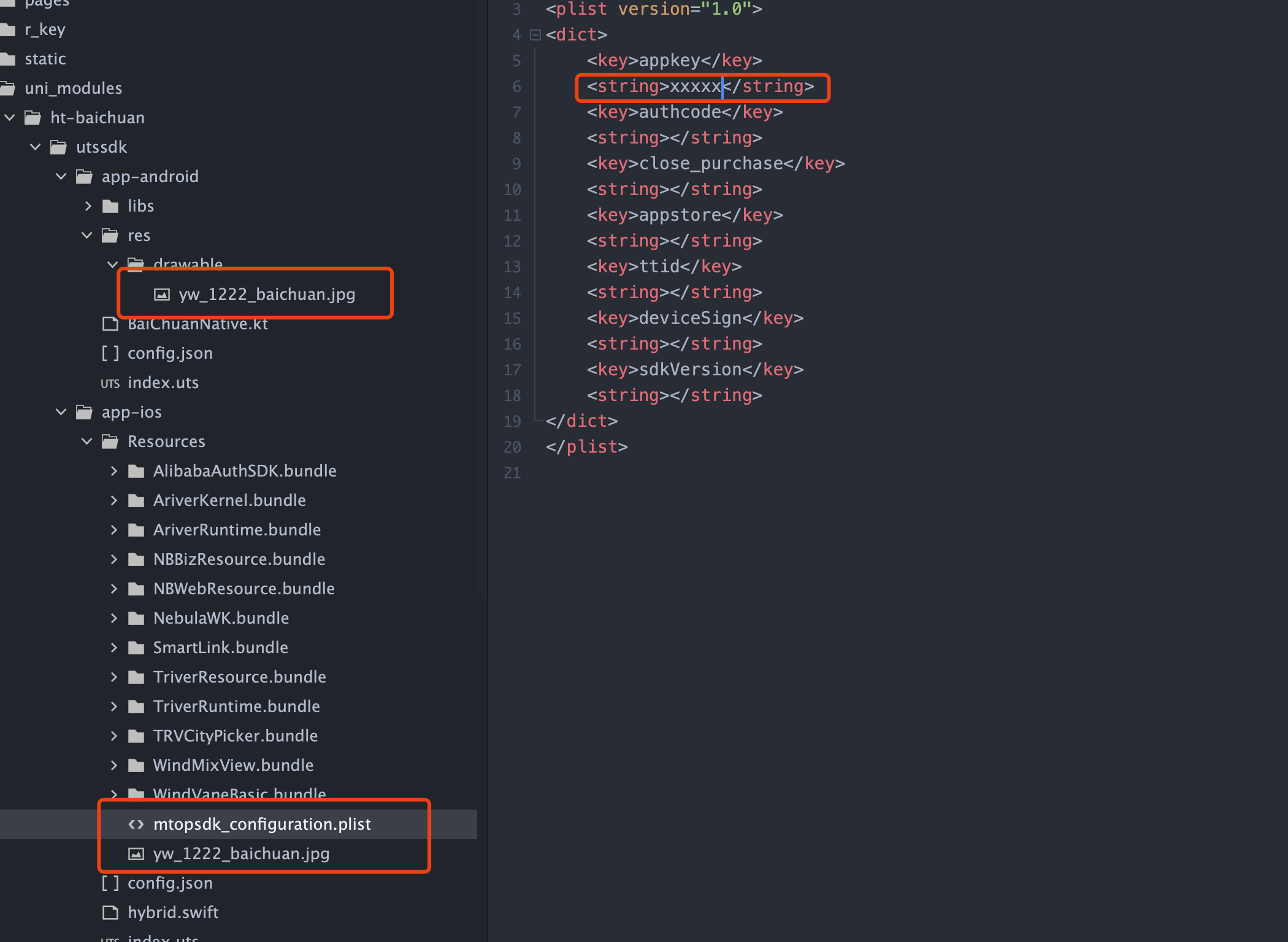 安全图片素材替换成自己的安全图片素材,否则会报错
handleOpenURL — 处理 App 回跳
添加以下代码到 App.vue 中:
// App.vue
// 处理第三方 App 回跳(淘宝授权登录 tbopen35373024:// 等)。
// uni-app 在 App 被 URL 唤起/回跳时,会把唤起参数写入 plus.runtime.arguments,
// 并触发 onShow(从后台返回)或 onLaunch(冷启动)。
function checkLaunchUrl() {
  // #ifdef APP-PLUS
  try {
    var arg = plus.runtime.arguments;
    if (arg && typeof arg === "string" && arg.length > 0) {
      console.log("[App] runtime.arguments = " + arg);
      if (arg.indexOf("tbopen") === 0 || arg.indexOf("baichuan") >= 0) {
        // 立即清空,避免 onShow 重复触发时把同一个 authcode 交给 SDK 两次
        plus.runtime.arguments = "";
        handleOpenURL(arg, function (res) {
          console.log("[App] handleOpenURL handled = " + (res && res.data));
        });
      }
    }
  } catch (e) {
    console.log("[App] checkLaunchUrl error: " + e);
  }
  // #endif
}

function startCheckLaunchUrl() {
  var vtC = 0;
  if (Vue.vT) {
    clearInterval(Vue.vT);
    Vue.vT = null;
  }
  Vue.vT = setInterval(function () {
    var arg = plus.runtime.arguments;
    vtC++;
    if (arg.startsWith("tb")) {
      checkLaunchUrl();
      clearInterval(Vue.vT);
      Vue.vT = null;
    } else {
      if (vtC > 20) {
        clearInterval(Vue.vT);
        Vue.vT = null;
      }
    }
  }, 400);
}

export default {
  onLaunch: function () {
    console.log("App Launch");
  },
  onShow: function () {
    console.log("App Show");
    // 应用启动或从后台回到前台时,检查是否由 tbopen/baichuan URL 唤起
    startCheckLaunchUrl();
  },
  onHide: function () {
    console.log("App Hide");
  },
};
0. DEMO 代码
<template>
  <view class="content">
    <view class="btn-group">
      <button class="test-btn" type="primary" @click="handleInitApp">初始化SDK</button>
      <button class="test-btn" type="default" @click="handleSecurityImage">安全图片诊断</button>
      <button class="test-btn" type="primary" @click="handleShowLogin">淘宝授权登录</button>
      <button class="test-btn" type="warn" @click="handleLogout">淘宝登出</button>
      <button class="test-btn" type="default" @click="handleShowPage">打开商品页</button>
      <button class="test-btn" type="default" @click="handleShow">打开电商选品页</button>
      <button class="test-btn" type="default" @click="handleShowAuth">淘宝客授权</button>
      <button class="test-btn" type="warn" @click="handleDiagnose">环境诊断(排查插件未加载)</button>

    </view>
    <view v-if="logs.length > 0" class="log-area">
      <text class="log-title">运行日志</text>
      <view v-for="(log, idx) in logs" :key="idx" class="log-item">
        <text :class="log.type === 'error' ? 'log-error' : 'log-info'">{{ log.msg }}</text>
      </view>
    </view>
  </view>
</template>

<script>
// UTS 插件使用命名导入
import {
  initApp,
  setDebug,
  getSecurityImageInfo,
  showLogin,
  logout,
  showPageByUrl,
  show,
  showAuth
} from '@/uni_modules/ht-baichuan';

// 判断 UTS 插件方法是否可用
const isNativePluginReady = function () {
  return typeof initApp === 'function' &&
    typeof getSecurityImageInfo === 'function' &&
    typeof showLogin === 'function' &&
    typeof logout === 'function';
};

export default {
  data() {
    return {
      title: 'Hello',
      logs: []
    };
  },
  onLoad() {
    this.logEnvInfo();
  },
  methods: {
    addLog(msg, type) {
      type = type || 'info';
      this.logs.unshift({
        msg: msg,
        type: type
      });
      // #ifdef APP-PLUS || APP-ANDROID || APP-IOS
      console.log(msg);
      // #endif
      if (this.logs.length > 50) this.logs.pop();
    },
    // 输出环境信息
    logEnvInfo() {
      var sys = uni.getSystemInfoSync();
      this.addLog('平台: ' + sys.platform);
      this.addLog('系统: ' + sys.osName + ' ' + sys.osVersion + ' (SDK ' + sys.osTheme + ')');
      this.addLog('设备: ' + sys.brand + ' ' + sys.model);
      this.addLog('App版本: ' + sys.appVersion + ' (' + sys.appVersionCode + ')');
      // #ifdef APP-PLUS || APP-ANDROID || APP-IOS
      this.addLog('APP-PLUS 运行时已就绪');
      if (typeof plus !== 'undefined') {
        this.addLog('plus 运行时可用');
      } else {
        this.addLog('plus 运行时未定义', 'error');
      }
      // #endif
      this.addLog('--- 内置插件探测(验证 requireNativePlugin 本身可用) ---');
      ['clipboard', 'storage', 'deviceInfo'].forEach((function (name) {
        try {
          var p = uni.requireNativePlugin(name);
          this.addLog('内置插件 "' + name + '": ' + (p ? 'OK' : 'undefined'));
        } catch (e) {
          this.addLog('内置插件 "' + name + '" 抛异常: ' + e, 'error');
        }
      }).bind(this));
      this.addLog('--- 百川 UTS 插件(命名导入) ---');
      try {
        var apiNames = ['initApp', 'getSecurityImageInfo', 'showLogin', 'logout', 'showPageByUrl', 'show', 'showAuth'];
        var apiFns = [initApp, getSecurityImageInfo, showLogin, logout, showPageByUrl, show, showAuth];
        apiNames.forEach((function (name, i) {
          var fn = apiFns[i];
          this.addLog('  方法 ' + name + ': ' + (typeof fn === 'function' ? 'OK' : '缺失'),
            typeof fn === 'function' ? 'info' : 'error');
        }).bind(this));
      } catch (e) {
        this.addLog('插件探测抛异常: ' + e, 'error');
      }
      this.addLog('--- 结论 ---');
      if (isNativePluginReady()) {
        this.addLog('百川 UTS 插件已加载;若方法均为 OK,按钮功能即可调用');
        uni.showToast({
          title: '插件已就绪',
          icon: 'success'
        });
      } else {
        this.addLog('百川 UTS 插件未就绪:请先在 HBuilderX 中「运行 → 运行到手机或模拟器 → 制作自定义调试基座」,再使用自定义基座运行', 'error');
        uni.showModal({
          title: '需要自定义基座',
          content: '当前标准基座未包含百川 UTS 插件。请在 HBuilderX 菜单「运行 → 运行到手机或模拟器 → 制作自定义调试基座」,基座装好后再运行。',
          showCancel: false
        });
      }
    },

    // ========== 百川 SDK 功能 ==========

    handleInitApp() {
      if (!isNativePluginReady()) {
        this.addLog('插件未就绪,请先制作自定义基座', 'error');
        return;
      }
      this.addLog('调用 initApp...');
      try {
        // 开启插件调试日志(排查问题时使用;正式上线可传 false)
        setDebug(true);
        // 先同步打印一次安全图片诊断信息(无论初始化成败都能看到)
        try {
          var imgInfo = getSecurityImageInfo();
          this.addLog('安全图片信息:\n' + imgInfo);
        } catch (e2) {
          this.addLog('getSecurityImageInfo 异常: ' + e2, 'error');
        }
        initApp({ appKey: 'xxxxxxx' }, (function (result) {
          this.addLog('initApp 回调: ' + JSON.stringify(result));
          if (result.finish) {
            uni.showToast({
              title: '初始化成功',
              icon: 'success'
            });
          } else {
            this.addLog('初始化失败: ' + result.data, 'error');
            uni.showModal({
              title: '初始化失败',
              content: result.data || '未知错误',
              showCancel: false
            });
          }
        }).bind(this));
      } catch (e) {
        this.addLog('initApp 异常: ' + e, 'error');
      }
    },

    handleSecurityImage() {
      if (typeof getSecurityImageInfo !== 'function') {
        this.addLog('getSecurityImageInfo 未导出,请重新制作自定义基座', 'error');
        return;
      }
      try {
        var info = getSecurityImageInfo();
        this.addLog('安全图片诊断:\n' + (info || '(空)'));
        uni.showModal({
          title: '安全图片诊断',
          content: info || '(空)',
          showCancel: false
        });
      } catch (e) {
        this.addLog('安全图片诊断异常: ' + e, 'error');
      }
    },

    handleShowLogin() {
      if (!isNativePluginReady()) {
        this.addLog('插件未就绪,请先制作自定义基座', 'error');
        return;
      }
      this.addLog('调用 showLogin...');
      try {
        showLogin((function (result) {
          this.addLog('showLogin 回调: ' + JSON.stringify(result));
          if (result.finish) {
            var user = {};
            try {
              user = JSON.parse(result.data || '{}');
            } catch (pe) {
              this.addLog('解析用户信息失败: ' + pe, 'error');
            }
            if (user.userId) {
              this.addLog('登录成功 userId=' + user.userId + ' token=' + user.token);
            }
            uni.showToast({
              title: '登录成功',
              icon: 'success'
            });
          } else {
            this.addLog('登录失败: ' + result.data, 'error');
          }
        }).bind(this));
      } catch (e) {
        this.addLog('showLogin 异常: ' + e, 'error');
      }
    },

    handleLogout() {
      if (!isNativePluginReady()) {
        this.addLog('插件未就绪,请先制作自定义基座', 'error');
        return;
      }
      this.addLog('调用 logout...');
      try {
        logout((function (result) {
          this.addLog('logout 回调: ' + JSON.stringify(result));
          if (result.finish) {
            uni.showToast({
              title: '已登出',
              icon: 'none'
            });
          } else {
            this.addLog('登出失败: ' + result.data, 'error');
          }
        }).bind(this));
      } catch (e) {
        this.addLog('logout 异常: ' + e, 'error');
      }
    },

    handleShowPage() {
      if (!isNativePluginReady()) {
        this.addLog('插件未就绪,请先制作自定义基座', 'error');
        return;
      }
      this.addLog('调用 showPageByUrl...');
      try {
        showPageByUrl({
          url: 'https://uland.taobao.com/',
          payload: {
            opentype: 'native',
            mmpid: 'mm_9885785178_3412550476_116286150032',
            unionId: '9885785178'
          }
        }, (function (result) {
          this.addLog('showPageByUrl 回调: ' + JSON.stringify(result));
        }).bind(this));
      } catch (e) {
        this.addLog('showPageByUrl 异常: ' + e, 'error');
      }
    },

    handleShow() {
      if (!isNativePluginReady()) {
        this.addLog('插件未就绪,请先制作自定义基座', 'error');
        return;
      }
      this.addLog('调用 show...');
      try {
        show({
          url: '',
          payload: {
            opentype: 'native',
            mmpid: 'mm_9885785178_3412550476_116286150032',
            unionId: '9885785178'
          }
        }, (function (result) {
          this.addLog('show 回调: ' + JSON.stringify(result));
        }).bind(this));
      } catch (e) {
        this.addLog('show 异常: ' + e, 'error');
      }
    },

    handleShowAuth() {
      if (!isNativePluginReady()) {
        this.addLog('插件未就绪,请先制作自定义基座', 'error');
        return;
      }
      this.addLog('调用 showAuth...');
      try {
        showAuth({
          appKey: 'xxxxxxx',
          appName: 'HTaobao'
        }, (function (result) {
          this.addLog('showAuth 回调: ' + JSON.stringify(result));
          if (result.finish) {
            uni.showToast({
              title: '授权成功',
              icon: 'success'
            });
          } else {
            this.addLog('授权失败: ' + result.data, 'error');
          }
        }).bind(this));
      } catch (e) {
        this.addLog('showAuth 异常: ' + e, 'error');
      }
    },

    handleDiagnose() {
      this.logs = [];
      this.logEnvInfo();
      uni.showToast({
        title: '诊断完成',
        icon: 'none'
      });
    }
  }
};
</script>

<style>
.content {
  padding: 20upx;
}

.btn-group {
  display: flex;
  flex-direction: column;
}

.test-btn {
  margin: 10upx 0;
  font-size: 28upx;
}

.log-area {
  margin-top: 20upx;
  padding: 15upx;
  background-color: #f5f5f5;
  border-radius: 8upx;
  max-height: 600upx;
  overflow-y: auto;
}

.log-title {
  font-weight: bold;
  font-size: 28upx;
  margin-bottom: 10upx;
  color: #333;
}

.log-item {
  margin: 6upx 0;
}

.log-info {
  color: #333;
  font-size: 24upx;
  line-height: 1.4;
}

.log-error {
  color: #dd524d;
  font-size: 24upx;
  line-height: 1.4;
}
</style>
一、引入插件
// #ifdef APP-PLUS
const baichuan = uni.requireNativePlugin("ht-baichuan");
// #endif
所有异步方法统一采用回调风格,回调参数结构固定为:
// 成功
{ finish: true, data: '...' }

// 失败
{ finish: false, data: '错误描述' }
data字段在返回对象/数组类信息时为 JSON 字符串,需JSON.parse(result.data)后使用;纯文本类结果直接读取即可。
二、快速上手
// #ifdef APP-PLUS
const baichuan = uni.requireNativePlugin("ht-baichuan");

// 1. 初始化(建议在 App.vue onLaunch 中调用)
baichuan.initApp({ appKey: "你的百川AppKey" }, (res) => {
  if (res.finish) {
    console.log("百川 SDK 初始化成功", res.data);
  } else {
    console.error("初始化失败", res.data);
  }
});
// #endif
三、API 列表
| 方法 | 说明 | Android | iOS |
|---|---|---|---|
| initApp | 初始化百川 SDK | √ | √ |
| setDebug | 调试日志开关 | 空实现 | √ |
| getSecurityImageInfo | 获取安全图片诊断信息 | 返回空串 | √ |
| showLogin | 淘宝授权登录 | √ | √ |
| logout | 清除淘宝登录态 | √ | √ |
| showPageByUrl | 通过链接打开电商页面 | √ | √ |
| show | 打开电商页面(空 url 走百川默认页) | √ | √ |
| showAuth | 唤起淘宝客授权弹窗 | √ | √ |
| handleOpenURL | 处理淘宝回跳 URL | 空实现 | √ |
| startCheckLaunchUrl | 自动识别并处理 tbopen/baichuan 唤起 | — | √ |
1. initApp — 初始化 SDK
调用任何电商/登录相关方法前必须先初始化。
baichuan.initApp(
  {
    appKey: "xxxxxxx", // 百川后台分配的 AppKey
  },
  (result) => {
    if (result.finish) {
      console.log("初始化成功:", result.data); // "initSDK success"
    } else {
      console.error("初始化失败:", result.data);
    }
  },
);| 参数 | 类型 | 必填 | 说明 |
|---|---|---|---|
options.appKey |
String | iOS 必填 | 百川后台分配的应用 AppKey(如 x'x'x'x'x'x'x)。iOS 会据此配置 SDK;Android 当前未使用该字段 |
重复调用安全:iOS 内部在 SDK 已初始化(
sdkState=2)时会直接回调成功。
2. setDebug — 调试开关
开启后输出插件及原生层诊断日志(iOS 还会写入沙盒 Documents/ht_diag.log)。默认关闭,发布版本请勿开启。
baichuan.setDebug(true);应在
initApp之前调用。Android 端为空实现,调用无副作用。
3. getSecurityImageInfo — 安全图片诊断
返回安全图片(yw_1222_baichuan.jpg)的路径、文件大小、像素尺寸等诊断文本,用于排查 iOS 初始化失败(错误码 100102 等)问题。
const info = baichuan.getSecurityImageInfo();
console.log(info);
Android 端固定返回空字符串。
4. showLogin — 淘宝授权登录
唤起淘宝 App 授权页面,获取用户身份信息。
baichuan.showLogin((result) => {
  if (result.finish) {
    const user = JSON.parse(result.data);
    console.log("用户信息:", user);
  } else {
    console.error("登录失败:", result.data);
  }
});返回字段(result.data 解析后):
| 字段 | Android | iOS | 说明 |
|---|---|---|---|
userId |
√ | √ | iOS 为 openId,Android 为 userId |
openId |
√ | — | Android 额外返回 |
token |
— | √ | iOS 顶部访问令牌 topAccessToken |
- iOS 已登录时会直接返回当前用户信息,不重复唤起授权页。
- iOS 内置 30 秒超时兜底;首次授权失败(错误码 13066/1003)会自动延迟 1 秒重试一次。
- 必须正确配置 URL Scheme 与回跳处理,详见 第五节日志与回跳配置。
5. logout — 登出
清除当前淘宝登录态。
baichuan.logout((result) => {
  console.log("登出结果:", result.finish);
});
6. showPageByUrl — 通过 URL 打开电商页面
通过商品/店铺/活动链接打开页面,可控制唤端或 H5 方式。
baichuan.showPageByUrl(
  {
    url: "https://detail.tmall.com/item.htm?id=123456",
    payload: {
      opentype: "auto", // 'auto' | 'native' | 'html5' | 'h5'
      mmpid: "", // 淘客 PID,留空使用内置默认
      unionId: "", // 联盟 ID,留空使用内置默认
    },
  },
  (result) => {
    console.log("打开结果:", result.finish, result.data);
  },
);
opentype |
行为 |
|---|---|
auto / native |
优先唤起淘宝/天猫 App(iOS isNeedOpenByAliApp=true;Android 映射为 OpenType.Native) |
html5 / h5 |
不唤起 App,在 App 内 WebView 打开 |
未传
opentype时:iOS 默认 html5;Android 默认 html5(但 Android 实现中html5被映射为OpenType.Auto,表现为自动唤端降级 H5)。
7. show — 打开电商页面
与 showPageByUrl 入参结构一致;当 url 为空字符串时,由百川 SDK 打开其默认页面。
baichuan.show(
  {
    url: "", // 商品/店铺链接;留空走百川默认页
    payload: {
      opentype: "auto",
      mmpid: "",
      unionId: "",
    },
  },
  (result) => {
    console.log("打开结果:", result.finish);
  },
);
当前版本中
show与showPageByUrl底层调用相同的原生打开逻辑。README 旧版提到的「自动构造联盟选品页 URL / relationId / taokeAppKey / backUrl」等参数在当前原生实现中未生效,如需打开选品页请自行构造完整 URL 后传入url字段。
8. showAuth — 淘宝客授权
唤起淘宝客授权弹窗,获取 accessToken。
baichuan.showAuth(
  {
    appKey: "你的淘客AppKey",
    appName: "HTaobao", // 可选,默认空
  },
  (result) => {
    if (result.finish) {
      const auth = JSON.parse(result.data);
      console.log("accessToken:", auth.accessToken);
      console.log("expireTime:", auth.expireTime);
    } else {
      console.error("授权失败:", result.data);
    }
  },
);| 参数 | 类型 | 必填 | 说明 |
|---|---|---|---|
appKey |
String | 是 | 淘宝客 AppKey |
appName |
String | 否 | 应用名称,默认空字符串 |
四、payload 参数说明
showPageByUrl / show 的 payload 字段当前实际生效的参数如下:
| 字段 | 类型 | 默认值 | 说明 |
|---|---|---|---|
opentype |
String | html5 |
打开方式:auto / native / html5 / h5 |
mmpid |
String | mm_9885785178_3412550476_116286150032 |
淘宝客 PID(mm_xxx_xxx_xxx 格式) |
unionId |
String | 9885785178 |
联盟 ID |
旧版文档中的
ybhpss、relationId、taokeAppKey、backUrl在当前版本原生代码中未被读取,传入不会生效。ISV Code 内部固定为app,回跳 URL 内部固定(Android 为qmbb://open,iOS 为tbopen{AppKey}://)。
五、URL Scheme 与回跳配置(iOS 必看)
淘宝授权/电商页面需要从淘宝 App 回跳回本 App,必须正确配置:
1. 配置 URL Scheme
在项目的 manifest.json → App 原生模块配置 → iOS URL Scheme 中,添加形如 tbopen{AppKey} 的 scheme,例如 AppKey 为 xxxxxxxx 时:
tbopenxxxxxxx2. 配置白名单 LSApplicationQueriesSchemes
插件的 config.json 已自动声明以下查询 scheme,无需手动配置:
tbopen、tmall、taobao、taobaoliteiOS 系统对
LSApplicationQueriesSchemes有 50 条上限,插件已通过 hook 方式绕过因白名单被截断导致的「误判未安装淘宝」问题。
3. 处理回跳
在 App.vue 中调用 startCheckLaunchUrl(推荐)或 handleOpenURL,参考 第 10 节。
六、依赖与原生配置
Android
- 安全图片:将百川后台下载的
yw_1222_baichuan.jpg放入 app-android/res/drawable/(插件已自带默认图,替换为你自己 AppKey 对应的图片)。 - minSdkVersion:21
- 仓库依赖(已在 config.json 配置,自动拉取):
com.github.sod5524.ht-baichuan-aar系列 AAR(alibclogin / alibcnbtrade / alibcprotocol 等)com.alibaba:fastjson:1.2.83、androidx.cardview:cardview:1.0.0
iOS
- 安全图片:将
yw_1222_baichuan.jpg放入 app-ios/Resources/(插件已自带)。 - deploymentTarget:13.0
- CocoaPods 依赖(已在 config.json 配置):
ht-baichuan-lib1.0.2 Info.plist自动注入LSApplicationQueriesSchemes:tbopen、tmall、taobao、taobaolite。
七、Promise 封装示例
// utils/baichuan.js
// #ifdef APP-PLUS
const baichuan = uni.requireNativePlugin("ht-baichuan");
// #endif

export function initApp(appKey) {
  return new Promise((resolve, reject) => {
    baichuan.initApp({ appKey }, (r) =>
      r.finish ? resolve(r) : reject(r.data),
    );
  });
}

export function showLogin() {
  return new Promise((resolve, reject) => {
    baichuan.showLogin((r) =>
      r.finish ? resolve(JSON.parse(r.data)) : reject(r.data),
    );
  });
}

export function logout() {
  return new Promise((resolve, reject) => {
    baichuan.logout((r) => (r.finish ? resolve(r) : reject(r.data)));
  });
}

export function showPageByUrl(url, payload = {}) {
  return new Promise((resolve, reject) => {
    baichuan.showPageByUrl({ url, payload }, (r) =>
      r.finish ? resolve(r) : reject(r.data),
    );
  });
}

export function showAuth(appKey, appName = "HTaobao") {
  return new Promise((resolve, reject) => {
    baichuan.showAuth({ appKey, appName }, (r) =>
      r.finish ? resolve(JSON.parse(r.data)) : reject(r.data),
    );
  });
}

export { baichuan };
八、常见问题排查
1. iOS 初始化失败 / 错误码 100102(读取身份图片 AppKey 失败)
- 确认使用的是与本 App BundleID、AppKey 匹配的安全图片
yw_1222_baichuan.jpg。 - 调用
baichuan.getSecurityImageInfo()查看诊断信息,确认图片在 main bundle 中且大小、像素正常。 - 打开调试日志
setDebug(true),查看沙盒Documents/ht_diag.log。
2. iOS 点击登录无反应、不跳淘宝
- 确认已配置 URL Scheme
tbopen{AppKey},并在App.onShow中调用startCheckLaunchUrl。 - 确认设备已安装淘宝 App;
opentype非html5时才会唤起淘宝。 - 打开
setDebug(true),根据日志中canOpenURL、isLoginSvrAvaleable、ALSmartLink.canOpenApp等关键字排查。
3. 打开页面长时间无回调
- iOS 端
showPageByUrl/show/showLogin均内置 30 秒超时,超时后回调finish:false,请据此提示用户重试。
4. Android 登录返回字段与 iOS 不同
- Android 返回
{ userId, openId },iOS 返回{ userId, token }。业务层取用时注意平台差异,建议用条件编译做兼容。


 下载 3
下载 3
 赞赏 0
赞赏 0


 下载 12672087
 赞赏 1955





























 赞赏
赞赏

 京公网安备:11010802035340号