更新记录
0.0.1(2022-10-26)
下载此版本
初次提交
平台兼容性
uni-app
| Vue2 |
Vue3 |
Chrome |
Safari |
app-vue |
app-nvue |
Android |
iOS |
鸿蒙 |
| √ |
× |
- |
- |
- |
- |
- |
- |
- |
| 微信小程序 |
支付宝小程序 |
抖音小程序 |
百度小程序 |
快手小程序 |
京东小程序 |
鸿蒙元服务 |
QQ小程序 |
飞书小程序 |
小红书小程序 |
快应用-华为 |
快应用-联盟 |
| - |
- |
- |
- |
- |
- |
- |
- |
- |
- |
- |
- |
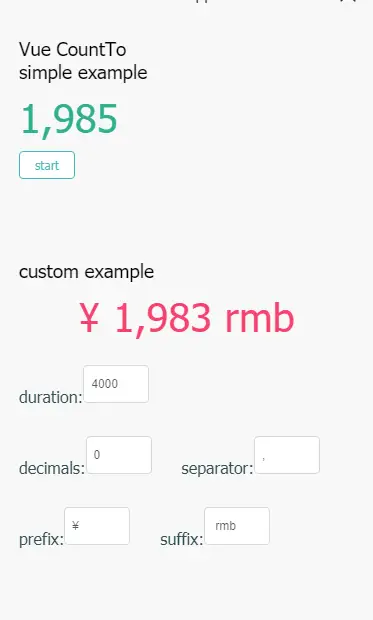
count-to
Example
<template>
    <view class='container'>
        <text>Vue CountTo</text>
        <view>
            <view class="example-item">
                <text> simple example</text>
                <count-to class='example1' :value='startVal1' :duration='4000'>
                </count-to>
                <view class='example-btn' @click='changeValue'>start</view>
            </view>
            <view class="example-item">
                <text> custom example</text>
                <count-to class='example3' :value="startVal1" :duration='_duration' :decimals='_decimals'
                    :separator='_separator' :prefix='_prefix' :suffix='_suffix'>
                </count-to>
                    <view class="view">duration: <input type="number" v-model.number='setDuration'
                            name='durationInput' /></view>
                    <br />
                    <view class="view">decimals: <input type="number" v-model.number='setDecimals'
                            name='decimalsInput' /></view>
                    <view class="view">separator: <input v-model='setSeparator' name='separatorInput' /></view>
                    <view class="view">prefix: <input v-model='setPrefix' name='prefixInput' /></view>
                    <view class="view">suffix: <input v-model='setSuffix' name='suffixInput' /></view>
                </view>
            </view>
        </view>
    </view>
</template>

<script>
    export default {
        data() {
            return {
                setDuration: 4000,
                setDecimals: 0,
                setSeparator: ',',
                setSuffix: ' rmb',
                setPrefix: '¥ ',
                startVal1: 0,
            }
        },
        computed: {
            _duration() {
                if (this.setDuration) {
                    return this.setDuration
                } else {
                    return 100
                }
            },
            _decimals() {
                if (this.setDecimals) {
                    if (this.setDecimals < 0 || this.setDecimals > 20) {
                        alert('digits argument must be between 0 and 20')
                        return 0
                    }
                    return this.setDecimals
                } else {
                    return 0
                }
            },
            _separator() {
                return this.setSeparator
            },
            _suffix() {
                return this.setSuffix
            },
            _prefix() {
                return this.setPrefix
            },
        },
        methods: {
            changeValue() {
                console.log(999)
                this.startVal1 = this.startVal1 + 1000.10
            },
        }
    }
</script>

<style>
    .container {
        /* width: 980px; */
        margin: 20px;
    }

    .example-btn {
        display: inline-block;
        margin-bottom: 0;
        font-weight: 500;
        text-align: center;
        -ms-touch-action: manipulation;
        touch-action: manipulation;
        cursor: pointer;
        background-image: none;
        border: 1px solid transparent;
        white-space: nowrap;
        line-height: 1.5;
        padding: 4px 15px;
        font-size: 12px;
        border-radius: 4px;
        -webkit-user-select: none;
        -moz-user-select: none;
        -ms-user-select: none;
        user-select: none;
        -webkit-transition: all .3s cubic-bezier(.645, .045, .355, 1);
        transition: all .3s cubic-bezier(.645, .045, .355, 1);
        position: relative;
        color: rgba(0, 0, 0, .65);
        background-color: #fff;
        border-color: #d9d9d9;
    }

    .example-btn:hover {
        color: #4AB7BD;
        background-color: #fff;
        border-color: #4AB7BD;
    }

    .example-item {
        margin-bottom: 80px;
    }

    .example1 {
        font-size: 40px;
        color: #30B08F;
        display: block;
        margin: 10px 0;
    }

    .example2 {
        font-size: 40px;
        color: #E65D6E;
        display: block;
        margin: 10px 0;
    }

    .example3 {
        font-size: 50px;
        color: #F6416C;
        display: block;
        margin: 10px 0;
        text-align: center;
        font-size: 40px;
        font-weight: 500;
    }

    .view {
        color: #2f4f4f;
        font-size: 16px;
        display: inline-block;
        margin: 15px 30px 15px 0;
    }

    input {
        position: relative;
        display: inline-block;
        padding: 4px 7px;
        width: 50px;
        height: 28px;
        cursor: text;
        font-size: 12px;
        line-height: 1.5;
        color: rgba(0, 0, 0, .65);
        background-color: #fff;
        background-image: none;
        border: 1px solid #d9d9d9;
        border-radius: 4px;
        -webkit-transition: all .3s;
        transition: all .3s;
    }

    .startBtn {
        margin-left: 20px;
        font-size: 20px;
        color: #30B08F;
        background-color: #fff;
    }

    .startBtn:hover {
        background-color: #30B08F;
        color: #fff;
        border-color: #30B08F;
    }

    .pause-resume-btn {
        font-size: 20px;
        color: #E65D6E;
        background-color: #fff;
    }

    .pause-resume-btn:hover {
        background-color: #E65D6E;
        color: #fff;
        border-color: #E65D6E;
    }
</style>
demo:

Options
| Property |
Description |
type |
default |
| value |
the value you want to |
Number |
0 |
| duration |
duration in millisecond |
Number |
3000 |
| autoplay |
when mounted autoplay |
Boolean |
true |
| decimals |
the number of decimal places to show |
Number |
0 |
| decimal |
the split decimal |
String |
. |
| separator |
the separator |
String |
, |
| prefix |
the prefix |
String |
'' |
| suffix |
the suffix |
String |
'' |
| useEasing |
is use easing function |
Boolean |
true |
| easingFn |
the easing function |
Function |
— |
Functions
| Function Name |
Description |
| start |
start the countTo |
| pause |
pause the countTo |
| reset |
reset the countTo |


 收藏人数:
收藏人数:
 下载插件并导入HBuilderX
 赞赏(0)
赞赏(0)
 下载 17
下载 17
 赞赏 0
赞赏 0


 下载 12712462
 赞赏 1958





























 赞赏
赞赏

 京公网安备:11010802035340号