


 收藏人数:
收藏人数:
 https://github.com/13982720426/uniapp-plugin-atl-map.git
 下载插件并导入HBuilderX
 下载示例项目ZIP
 赞赏(30)
更新记录
2.0.0(2026-01-06) 下载此版本
feat: 全面重构为 Vue 3 版本
- 使用
<script setup>和 Composition API 重构所有组件 - 提取通用逻辑到 useMapCommon hook
- 更新地图 SDK 导出方式为 ES Module
- 优化代码结构,移除冗余代码
- 完善 TypeScript 类型定义(部分)
1.4.7(2024-09-20) 下载此版本
fix: 修复点击poi点位,导致tap事件失效问题
1.4.6(2024-09-01) 下载此版本
update: 更新readme,添加地区经纬度生成小工具链接
查看更多平台兼容性
uni-app(3.7.0)
| Vue2 | Vue2插件版本 | Vue3 | Vue3插件版本 | Chrome | Safari | app-vue | app-nvue | Android | iOS | 鸿蒙 |
|---|---|---|---|---|---|---|---|---|---|---|
| √ | 1.4.7 | √ | 2.0.0 | - | - | - | - | - | - | - |
| 微信小程序 | 支付宝小程序 | 抖音小程序 | 百度小程序 | 快手小程序 | 京东小程序 | 鸿蒙元服务 | QQ小程序 | 飞书小程序 | 小红书小程序 | 快应用-华为 | 快应用-联盟 |
|---|---|---|---|---|---|---|---|---|---|---|---|
| - | - | - | - | - | - | - | - | - | - | - | - |
atl-map (Vue 3) 微信小程序高德、腾讯、百度地图
⚠️ 重要通知 本项目已全面重构为 Vue 3 版本 (v2.0.0)。 如果您的项目仍在使用 Vue 2,请使用 v1.4.7 稳定分支 (维护模式)。
- v2.x (Vue 3) 文档 - 当前主分支
- v1.x (Vue 2) 文档
简易好用的微信小程序地图定位,封装腾讯、高德、百度地图 sdk,atl-map 开箱即用。
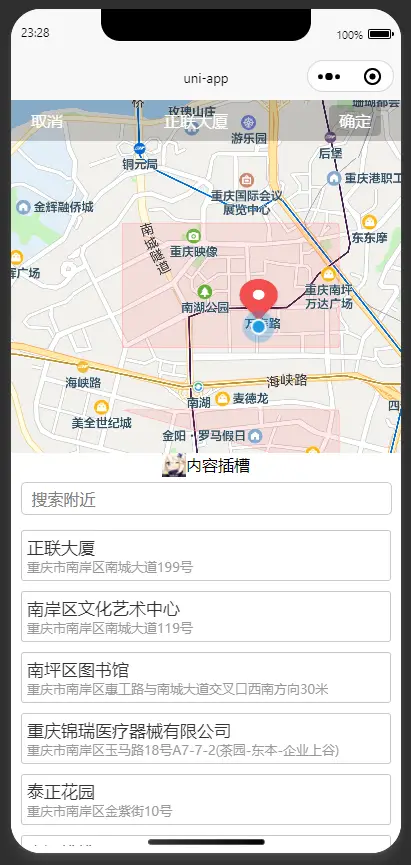
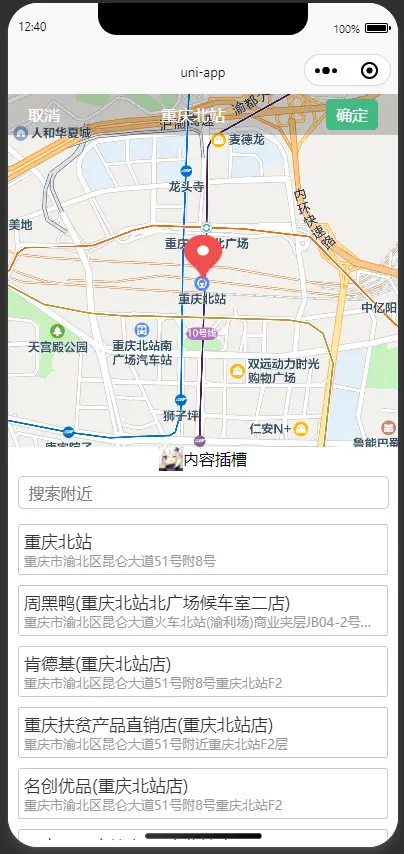
支持点击定位获取具体位置信息和经纬度,地图搜索,经纬度解析(逆地理编码:经纬度->地点描述),新增内容插槽支持自定义内容,电子围栏(地图多边形)。
v2.0.0 (Vue 3) 版本特性
- Vue 3 原生支持:使用
<script setup>和 Composition API 重构,性能更好,代码更简洁。 - ES Module SDK:对地图 SDK 进行了 ES Module 改造,完美适配 Vite 构建。
- 逻辑复用:提取通用地图逻辑到 Composable 函数,减少代码冗余。
- TypeScript 友好:更好的类型推导支持(未来版本将提供完整 TS 支持)。
使用前准备
在平台创建应用并申请 key
申请高德、腾讯、百度地图 key
- 高德地图测试 key 申请地址
https://console.amap.com/dev/key/app服务平台选择微信小程序 - 腾讯地图测试 key 申请地址
https://lbs.qq.com/dev/console/application/mine启用产品选择微信小程序 - 百度地图测试 key 申请地址
https://lbs.baidu.com/apiconsole/key/create#/home应用类型选择微信小程序
重要!!!
配置文件 manifest.json 需配置 Vue 3 版本,且微信小程序需要开启定位权限配置requiredPrivateInfos和permission
manifest.json (Vue 3 配置)
{
    "vueVersion": "3",
    "mp-weixin": {
        "appid": "xxxx",
        "usingComponents": true,
        "requiredPrivateInfos": ["getLocation"],//开启定位权限
        "permission": {
            "scope.userLocation": {
                "desc": "开启定位权限"
            }
        }
    }
}
基本使用
Vue 3 模板
<template>
    <view class="">
        <view style="padding: 20px">
            <view class="">地址:{{ title }}</view>
            <view class="">详细地址:{{ address }}</view>
            <view class="">经度:{{ longitude }}</view>
            <view class="">纬度:{{ latitude }}</view>
        </view>
        <view style="width: 90vw; margin: 5vw">
            <button @click="onClick">点击打开地图</button>
        </view>
        <atl-map
            v-if="show"
            :disable="disable"
            :longitude="longitude"
            :latitude="latitude"
            :marker="marker"
            :mapKey="mapKey"
            :mapType="mapType"
            @confirm="confirm"
        >
            <template v-slot:content>
                <view style="position: absolute; bottom: 0; width: 100%; height: 24px; background-color: white">
                    <view style="display: flex; align-items: center; justify-content: center">
                        <image style="width: 24px; height: 24px" :src="imageSrc"></image>
                        <text>内容插槽</text>
                    </view>
                </view>
            </template>
        </atl-map>
    </view>
</template>

<script setup>
import { ref } from 'vue';

const disable = ref(false);
const show = ref(false);
const title = ref('');
const address = ref('');
const longitude = ref('');
const latitude = ref('');
const imageSrc = ref('/static/logo.png');
const marker = ref({
    id: 1,
    height: 50,
    width: 40
    // iconPath: '/static/comm/position.png'
});

// mapKey: '42795f9a59358dea58a8bxxx',//高德地图测试key
const mapKey = ref('ZNJBZ-E6RHJ-EV3F2-DL73K-ARTTH-3EBRZ'); //腾讯地图测试key
// mapKey: 'p5mGzPEt30bwv1yEkeQGsGP4Xrs9xxxx', //百度地图
const mapType = ref('tmap'); // tmap bmap amap

const onClick = () => {
    show.value = true;
};

const confirm = (e) => {
    if (e) {
        longitude.value = e.longitude;
        latitude.value = e.latitude;
        title.value = e.title;
        address.value = e.address;
    }
    show.value = false;
};
</script>
电子围栏案例
添加了电子围栏demo,因为使用第三方插件判断是否在范围内, 重要!!! 需要在项目中额外下载 @turf/boolean-point-in-polygon 插件 或者是自己写个方法判断是否在范围内
npm i @turf/boolean-point-in-polygon
如果启动报错 @turf/helpers 未找到,那请下载 npm i @turf/helpers
地区经纬度生成 参考 DataV.GeoAtlas地理小工具系列 可以选择范围选择器或者边界生成器生成经纬度数据
Vue 3 模板
<template>
  <view class="">
    <view style="padding:20px">
      <view class="">地址:{{ title }}</view>
      <view class="">详细地址:{{ address }}</view>
      <view class="">经度:{{ longitude }}</view>
      <view class="">纬度:{{ latitude }}</view>
    </view>
    <view style="width: 90vw; margin: 5vw">
      <button @click="onClick">点击打开地图</button>
    </view>
    <atl-map
      v-if="show"
      :disable="disable"
      :longitude="longitude"
      :latitude="latitude"
      :marker="marker"
      :mapKey="mapKey"
      :mapType="mapType"
      @confirm="confirm"
      @changeMarker="changeMarker"
      :polygons="polygons"
      :isPolygons="true"
    >
      <template v-slot:content>
        <view style="position: absolute; bottom: 0;width: 100%;height: 24px; background-color: white;">
          <view style="display: flex;align-items: center; justify-content: center;">
            <image style="width: 24px; height: 24px;" :src="imageSrc"> </image>
            <text> 内容插槽 </text>
          </view>
        </view>
      </template>
    </atl-map>
  </view>
</template>

<script setup>
import { ref } from 'vue';
import booleanPointInPolygon from "@turf/boolean-point-in-polygon";
import { point, polygon } from "@turf/helpers";

const polygons = ref([
    {
        points: [
            { longitude: "106.57", latitude: "29.52" },
            { longitude: "106.57", latitude: "29.53" },
            { longitude: "106.55", latitude: "29.53" },
            { longitude: "106.55", latitude: "29.52" },
            { longitude: "106.57", latitude: "29.52" },
        ],
        strokeWidth: 1,
        strokeColor: "#ff000066",
        fillColor: "#ff000016",
    },
    // ...
]);

const disable = ref(false);
const show = ref(false);
const title = ref('');
const address = ref('');
const longitude = ref('');
const latitude = ref('');
const imageSrc = ref('/static/logo.png');
const marker = ref({
    id: 1,
    height: 50,
    width: 40,
});
const mapKey = ref("ZNJBZ-E6RHJ-EV3F2-DL73K-ARTTH-3EBRZ");
const mapType = ref("tmap");

const changeMarker = (e) => {
    const { latitude, longitude } = e;
    const _polygons = polygons.value.map((p) => {
        return p.points.map((i) => [Number(i.longitude), Number(i.latitude)]);
    });
    const _point = point([longitude, latitude]);
    const _polygon = polygon(_polygons);
    // 根据电子围栏判断否禁用
    disable.value = booleanPointInPolygon(_point, _polygon);
};

const onClick = () => {
    show.value = true;
};

const confirm = (e) => {
    if (e) {
        longitude.value = e.longitude;
        latitude.value = e.latitude;
        title.value = e.title;
        address.value = e.address;
    }
    show.value = false;
};
</script>
预览


API
Props
| 参数 | 说明 | 类型 | 默认值 |
|---|---|---|---|
| mapKey | 必填,地图 KEY |
String |
腾讯测试 key(每日限量) |
| mapType | 非必填,地图类型(腾讯:'tmap',高德:'amap',百度:'bmap') |
String |
tmap |
| longitude | 非必填,经度 |
String |
当前定位 |
| latitude | 非必填,纬度 |
String |
当前定位 |
| marker | 非必填,点位配置,只支持一个点位 |
Object |
uniapp map 组件默认值 |
| disable | 非必填,确定按钮是否禁用 |
Boolean |
false |
| isPolygons | 非必填,是否显示多边形(电子围栏) |
Boolean |
false |
| polygons | 非必填,多边形配置(具体配置请看案例或者官网说明) |
Array |
[],uniapp map 组件 polygons 配置说明 |
| isCustomBar | 非必填,是否自定义顶部(一般自定义顶部标题栏时使用) |
Boolean |
false (自定义顶部标题栏时留出胶囊按钮安全距离) |
| top | 非必填,地图距离顶部位置(一般自定义顶部标题栏时使用) |
String、Number |
原生标题栏时,默认值:0,"navigationStyle": "custom"为自定义标题栏时,默认值:30 |
| changeMarker | 非必填,点位变化事件(可以通过 turf 插件判断是否在电子围栏内,再配合 disable 属性使用,具体使用参考完整 demo) |
Function |
返回值{title,latitude,longitude,address,...高德/腾讯/百度地图其他参数} |
| confirm | 非必填,点击确定事件 |
Function |
返回值{title,latitude,longitude,address,...高德/腾讯/百度地图其他参数} |
Slot
| 名称 | 说明 | 其他 |
|---|---|---|
| content | 自定义 content 内容 | 使用的是 uniapp cover-view 组件小程序注意事项请看官网 |
注意事项 (Vue 3 特别说明)
-
SDK 导入方式变更: 本项目已对地图 SDK 进行 ES Module 改造,如果你重新下载了 SDK,请务必参考以下方式修改导出语句:
- 高德 (
amap-wx.130.js): 改为export { AMapWX }; - 百度 (
bmap-wx.min.js): 改为export { BMapWX }; - 腾讯 (
qqmap-wx-jssdk.min.js): 改为export default QQMapWX;
- 高德 (
-
其他注意事项:
- 腾讯地图 key 每日限量测试,请自行申请
- 目前只支持微信小程序,其他平台请下载源码自行测试修改
- 微信小程序可能需要设置服务器域名
- 百度地图如果遇到
APP Referer校验失败,请在控制台重新配置应用
优化
开发初衷是为了能够支持各平台地图,满足需要不同地图的开发者。
推荐选定自己使用的平台之后,删除其他不用的组件和 SDK。
比如:只用腾讯地图,删除其他地图组件,在uni_modules/atl-map/components 下,删除 bmap、amap 文件夹,修改入口文件atl-map.vue,只用tmap组件。
<template>
  <view>
    <tmap
      :disable="disable"
      :longitude="longitude"
      :latitude="latitude"
      :mapKey="mapKey"
      :marker="marker"
      @confirm="confirm"
      @changeMarker="changeMarker"
      :polygons="polygons"
      :isPolygons="isPolygons"
    >
      <template v-slot:content>
        <slot name="content"></slot>
      </template>
    </tmap>
  </view>
</template>

<script setup>
import tmap from '../tmap/tmap.vue';

// 保持原有的 props 定义
const props = defineProps({
    mapKey: { type: String, default: '' },
    mapType: { type: String, default: 'tmap' },
    longitude: { type: [String, Number], default: '' },
    latitude: { type: [String, Number], default: '' },
    marker: { type: Object, default: () => ({}) },
    disable: { type: Boolean, default: false },
    isPolygons: { type: Boolean, default: false },
    polygons: { type: Array, default: () => [] },
    isCustomBar: { type: Boolean, default: false },
    top: { type: [String, Number], default: 0 }
});

const emit = defineEmits(['confirm', 'changeMarker', 'close']);

const confirm = (e) => emit('confirm', e);
const changeMarker = (e) => emit('changeMarker', e);
</script>
这样就减少冗余代码,节省内存
其他
微信小程序SDK下载地址 腾讯地图 SDK 高德地图 SDK 百度地图 SDK

 下载 2785
 赞赏 30
赞赏 30


 下载 12704400
 赞赏 1957





























 赞赏
赞赏



 京公网安备:11010802035340号