

 收藏人数:
收藏人数:
 下载插件并导入HBuilderX
更新记录
1.0.0(2021-07-25) 下载此版本
首次上传
平台兼容性
数据表格dataTable
使用说明
| 属性 | 类型 | 说明 |
|---|---|---|
| tableHeight | String | 表格的高度,默认屏幕的高度windowHeight |
| thList | Array | 表头的数据,默认为空数组 |
| colWidthList | Array | 每列宽度,默认为空数组 |
| thBgColor | String | 表头背景色,默认为#fff |
| borderColor | String | 网格线的颜色,默认为#eee,线条为2rpx solid |
| thColor | String | 表头文字颜色,默认为#333 |
| thSize | String | 表头文字大小,默认为28,单位为rpx |
| thHeight | String | 表头高度和行高,默认为60,单位为rpx |
| thBold | Boolean | 表头文字粗细,默认为false |
| tbList | Array | 表体的数据,默认为空数组 |
| tbBgColor | String | 表体背景色,默认为#fff |
| tbColor | String | 表体文字颜色,默认为#333 |
| tbSize | String | 表体文字大小,默认为28,单位为rpx |
| tbHeight | String | 表体每行高度,默认为60,单位为rpx |
| tbBold | Boolean | 表体文字粗细,默认为false |
| thFixed | Boolean | 是否固定表头,默认为true |
| thFirstFixed | Boolean | 表头第一个单元格是否固定,默认为true |
| firstColFixed | Boolean | 是否固定表体第一列,默认为true |
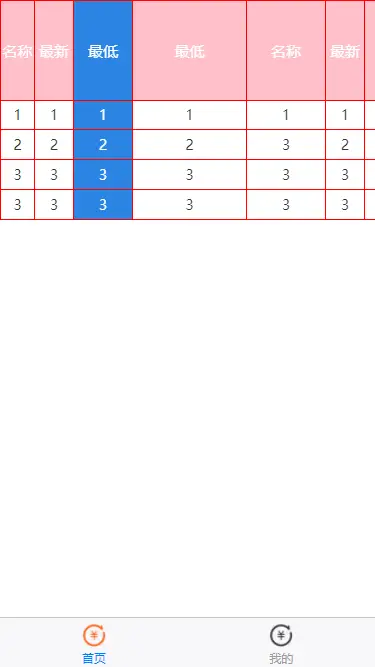
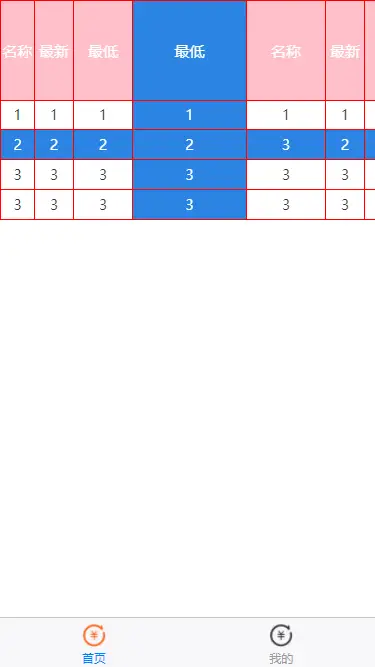
| activeBgColor | String | 选中单元格时的对应行列的选中背景颜色,默认为#2b85e4 |
| @clickHead | event | 点击表头时触发,返回表头索引 |
| @cancelHeadActive | event | 取消表头点击状态时触发,返回表头索引 |
| @clickContent | event | 点击表体单元格时触发 ,返回对应行列索引,格式为数组,先行后列 |
| @cancelActive | event | 取消表体单元格点击状态时触发,返回对应行列索引,格式为数组,先行后列 |
插槽
| slot | 说明 |
|---|---|
| content | 表体的插槽 |
数据格式
thList: ['名称', '最新', '最低', '最低', '名称', '最新', '最低' ],
colWidthList: ['70', '80', '120', '230', '160', '80', '120' ],
tbList: [
    ['1', '1', '1', '1', '1', '1', '1'],
    ['2', '2', '2', '2', '3', '2', '2'],
    ['3', '3', '3', '3', '3', '3', '3'],
    ['3', '3', '3', '3', '3', '3', '3'],
]
注意:
1、如果不使用colWidthList属性,表格将相对于表头的每列宽度进行自适应;
2、可能对tbList的数据格式不喜欢或者需求单双行的颜色不一样,所以提供表体插槽content来给大家进行自定义;
例子
<template>
    <view>
        <dataTable :thList="thList" :colWidthList="colWidthList" thBgColor="pink" thColor="#fff" thSize="30"
            thHeight="200" borderColor="red" :tbList="tbList">
        </dataTable>
    </view>
</template>
感谢
感谢@SirW大佬的的组件提供开发思路,大佬的组件链接

 下载 895
 赞赏 0
赞赏 0



 下载 12618359
 赞赏 1949





























 赞赏
赞赏

 京公网安备:11010802035340号